
SSO ID Password Reset 2026: Get Back Into Your Rajasthan SSO Account
Forgot your SSO password? Reset it online on the official Forgot Password page using your mobile or personal email, or by one SMS from your registered number.
For an SSO ID password reset, open sso.rajasthan.gov.in/forgot, choose “Mobile” or “Email (Personal)”, enter your SSOID and registered mobile number, and follow the verification to set a new password. If you still use your registered mobile, you can also send the SMS “RJ SSO PASSWORD” to 9223166166.
Dear users, a forgotten password is the number one reason people get stuck on the SSO portal, especially just before an exam form or result. This guide covers the exact field names on the reset page, the SMS route and its condition, how to change your password after login, strong-password tips and fixes for OTP and locked-account problems. Steps checked on 4 November 2026. This is an independent guide, and we never ask for your password or OTP.
Steps checked on the official portal on 4 November 2026. Independent guide — not the Government of Rajasthan.
SSO ID Password Reset Online on /forgot
The official Forgot Password page offers two options: “Mobile” or “Email (Personal)”. Both lead to the same result, a new password, so pick whichever detail you still have access to.
Step 1: Open the Official Forgot Password Page
Type sso.rajasthan.gov.in/forgot into your browser yourself. You can also go to sso.rajasthan.gov.in/signin and click “I Forgot my Password. Click Here”. Make sure the address ends in .rajasthan.gov.in.
Step 2: Choose Mobile or Email (Personal)
Select “Mobile” if you still have the mobile number registered on your SSO account. Select “Email (Personal)” if you prefer to verify through the personal email linked to your account.
Step 3: Enter Your SSOID or Official Email
In the field “Digital Identity (SSOID) or Email (mail.rajasthan.gov.in)”, type your SSOID. Government users who have an official mail.rajasthan.gov.in address can enter that instead. If you do not remember your SSOID, first follow our forgot SSO ID guide.
Step 4: Enter Your Registered Mobile Number
In “Registered Mobile Number”, type the mobile number linked to your SSO account. It must match the number on record, otherwise the reset cannot continue.
Step 5: Fill the Captcha and Submit
Type the code in “Enter Captcha” exactly as shown and press “Submit”. Use “Cancel” if you want to start again. Then complete the verification the portal shows, such as an OTP, and set your new password.
Step 6: Log In With the New Password
Go back to sso.rajasthan.gov.in/signin and log in with your SSOID and new password. See our SSO ID login guide if you need help with the login page.
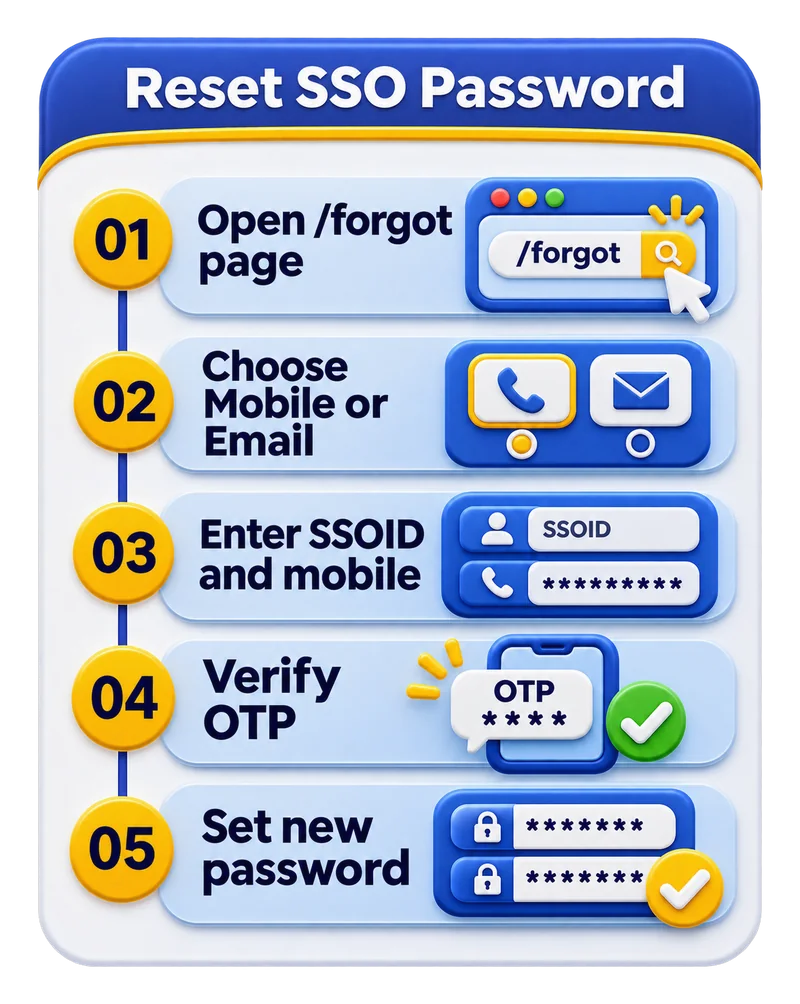
Type the OTP only on the official page. No real helpdesk, e-Mitra operator or government officer needs your OTP or password over phone, WhatsApp or chat.
Reset SSO Password by SMS
If the SIM with your registered mobile number is in your phone, the SMS route is quick. It only costs your normal operator SMS charge, if any.
- Step 1: Open the SMS app on the phone with your registered mobile number.
- Step 2: Type RJ SSO PASSWORD (with spaces between the words).
- Step 3: Send it to 9223166166.
- Step 4: Read the reply SMS and follow what it says.
- Step 5: Log in at sso.rajasthan.gov.in/signin and change the password to one only you know.
Condition: the SMS route works only if you have logged in to the SSO portal at least once on or after 07/09/2018. If not, use the online /forgot page or contact your district RajSSO helpdesk.
Online vs SMS: Which Route Should You Use?
| Route | What you need | Condition | Good to know |
|---|---|---|---|
| sso.rajasthan.gov.in/forgot – Mobile | SSOID (or mail.rajasthan.gov.in email) and registered mobile number | Access to the registered mobile for verification | Most common route for citizens |
| sso.rajasthan.gov.in/forgot – Email (Personal) | SSOID and your personal email linked to the account | Access to that email inbox | Useful if SMS is slow |
| SMS “RJ SSO PASSWORD” to 9223166166 | Registered mobile SIM | At least one login on or after 07/09/2018 | Fastest when the SIM is with you |
| District RajSSO helpdesk | Your identity details | Working days, 10 AM to 6 PM | When both other routes fail |
How to Change SSO ID Password After Login
If you know your current password and just want a new one, you do not need the Forgot Password page. Log in at sso.rajasthan.gov.in/signin, open your profile or account settings from the dashboard, and look for the option to change your password. Follow the fields the screen shows to enter and confirm your new password.
Menu labels can change between portal versions, so follow what you see on screen. The portal also publishes its password rules at sso.rajasthan.gov.in/passwordpolicy; read them before you choose a new password so it is accepted the first time.
It is a good habit to change your password if you logged in at a cyber café or e-Mitra kiosk, or if you ever shared it with anyone by mistake.
Strong Password Tips
A strong password protects your exam forms, scholarships, documents and payments linked to your SSOID. Follow the official password policy page and these simple habits.
- Length: Use a long password; longer passwords are much harder to guess.
- Mix: Combine capital letters, small letters, numbers and symbols; check the policy page for the exact rules.
- Avoid the obvious: Do not use your name, date of birth, mobile number or “123456”.
- Unique: Do not reuse the password of your email, Facebook or bank account.
- Private: Never write it on your admit card printout or share it in a WhatsApp group.
- Log out: On shared computers, always log out and do not let the browser save the password.
Problems and Solutions
Here are the problems people face most often while resetting the SSO password, with practical fixes.
OTP not received on my mobile.
Check that the number you typed matches your registered mobile number. Make sure you have network signal, the inbox is not full and DND or spam filters are not blocking messages. Wait a minute or two before requesting again, and try a different time if the server is busy.
The page says the mobile number does not match.
The number on your SSO account may be an old one. Try the “Email (Personal)” option if you have access to your linked email. If you cannot use either, see our SSO ID mobile number change guide and contact your district helpdesk.
My account seems locked after many wrong attempts.
Stop trying for a while instead of guessing again and again. Then reset the password through /forgot or the SMS route. If it still does not open, call your district RajSSO helpdesk on a working day between 10 AM and 6 PM.
The SMS “RJ SSO PASSWORD” got no reply.
Confirm the text has spaces and was sent from the registered number to 9223166166. If your last login was before 07/09/2018, the SMS route will not work; use the online page instead.
New password is not accepted.
It probably does not meet the password policy. Read sso.rajasthan.gov.in/passwordpolicy, add the missing type of character, and try again.
I forgot both my SSOID and password.
Recover the SSOID first on /forgotsd or by sending “RJ SSO” to 9223166166. Then reset the password. More fixes are on our SSO ID problems page.
हिंदी में जानकारी
SSO ID का पासवर्ड भूल गए हैं तो खुद sso.rajasthan.gov.in/forgot खोलें और “Mobile” या “Email (Personal)” विकल्प चुनें। “Digital Identity (SSOID) or Email (mail.rajasthan.gov.in)” में अपनी SSOID, “Registered Mobile Number” में रजिस्टर्ड मोबाइल नंबर और कैप्चा भरकर Submit करें, फिर OTP से सत्यापन करके नया पासवर्ड बनाएं। दूसरा तरीका: रजिस्टर्ड मोबाइल से “RJ SSO PASSWORD” लिखकर 9223166166 पर SMS भेजें; यह तभी काम करता है जब आपने 07/09/2018 को या उसके बाद कम से कम एक बार लॉगिन किया हो। OTP न आए तो नेटवर्क और मोबाइल नंबर जांचें, थोड़ी देर बाद दोबारा कोशिश करें। अपना पासवर्ड या OTP किसी को न बताएं, और समस्या बनी रहे तो कार्य दिवसों में सुबह 10 से शाम 6 बजे तक ज़िले के RajSSO हेल्पडेस्क से संपर्क करें।
FAQs
Conclusion
An SSO ID password reset takes a few minutes: use sso.rajasthan.gov.in/forgot with Mobile or Email (Personal), or send “RJ SSO PASSWORD” to 9223166166 if you have logged in since 07/09/2018.
After the reset, choose a strong, unique password that follows the portal’s policy and keep it private. If OTPs never arrive or your number has changed, the district RajSSO helpdesk is your next step.