
Fake SSO Website Alert 2026: How to Spot SSO ID Fraud and Stay Safe
The only official Rajasthan SSO portal is sso.rajasthan.gov.in. Learn the signs of the real page, the red flags of fake SSO websites and phishing, and the exact steps to take if you were tricked.
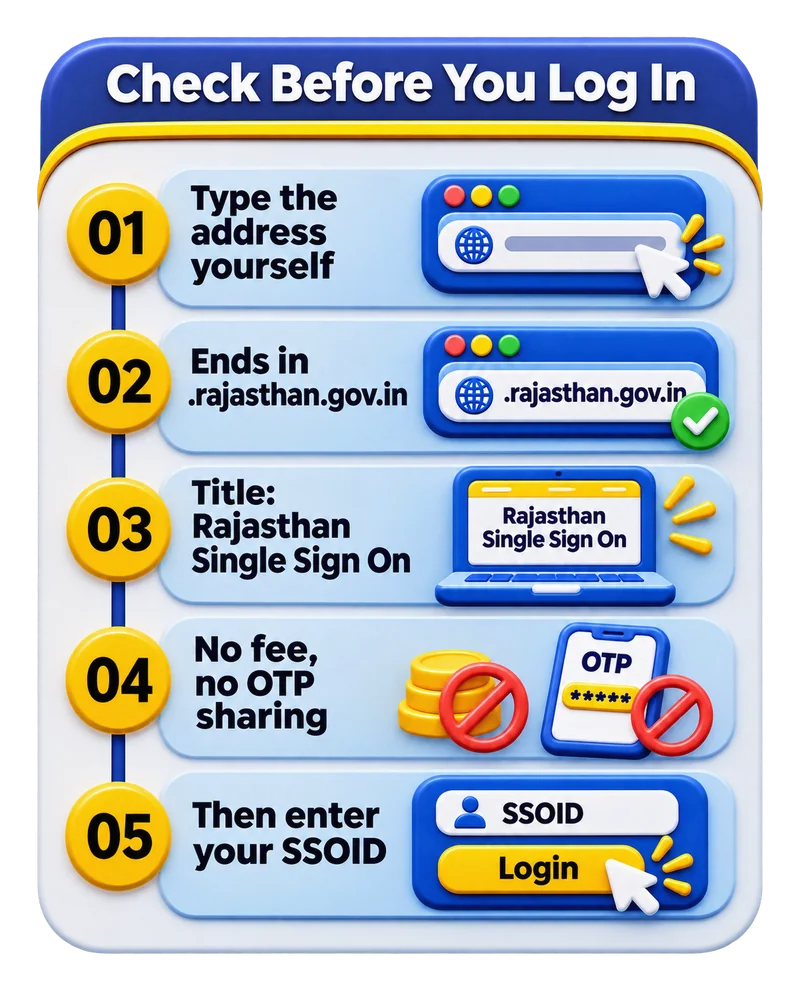
A fake SSO website is any page that copies the look of the Rajasthan SSO portal but does not run on sso.rajasthan.gov.in; the quick check is to read the address bar and make sure it ends in .rajasthan.gov.in before you type anything. If you already entered your password or shared an OTP on a fake page, change your password on the real portal immediately and report it, as explained below.
Dear users, “is sso.rajasthan.gov.in safe?” is a fair question. Yes, the real portal at that address is the official Government of Rajasthan service, built and hosted by DoIT&C. The danger comes from copies, look-alike domains, unknown apps and phone callers who use the SSO name. This guide shows you how to recognise the real portal, spot SSO ID fraud and phishing, and recover safely. ssoidguide.net is an independent guide, not the government portal, and we never ask for your password or OTP.
Steps checked on the official portal on 4 November 2026. Independent guide — not the Government of Rajasthan.
How to Recognise the Real SSO Portal
These are the signs of the genuine Rajasthan Single Sign On portal. Steps checked on 4 November 2026.
- Address: sso.rajasthan.gov.in, with “.rajasthan.gov.in” at the end of the site name. Login is at sso.rajasthan.gov.in/signin.
- Name and tagline: “Rajasthan Single Sign On” with “One Digital Identity for all Applications”.
- Owner: Built and hosted by the Department of Information Technology & Communication (DoIT&C), Government of Rajasthan.
- Login and Registration: Separate Login (/signin) and Registration (/register) options.
- ID field: The first box is labelled “Digital Identity (SSOID/ Username)”, followed by “Password” and “Enter Captcha”.
- Recovery links: “I Forgot my Digital Identity (SSOID). Click Here” and “I Forgot my Password. Click Here”.
- Language toggle: English and हिन्दी at the top.
- Free to use: No fee is asked just to open the portal or log in.
Copies can imitate colours, logos and wording. The address bar is the one thing they cannot copy, so check it every time.
Is sso.rajasthan.gov.in Safe?
Yes. sso.rajasthan.gov.in is the official single sign-on portal of the Government of Rajasthan. It is the same address that our SSO ID open guide tells you to type for login.
The problem is not the real site but how people reach it. Many users search “sso id login” and click the first result, an advert, or a link from a WhatsApp group. Some of those links lead to look-alike pages, ad-filled copies or pages that collect login details.
The safe habit is to type sso.rajasthan.gov.in yourself, or use a bookmark you created from the real site. Our SSO ID app guide shows how to save it to your phone’s home screen.
Red Flags of a Fake SSO Website or SSO ID Fraud
SSO phishing works by making you hurry. If you see any of these signs, stop and close the page or end the call.
Wrong Address
The site name ends in .com, .org, .in alone, .online or anything other than .rajasthan.gov.in. Words like “sso-rajasthan” or “rajsso-login” on another domain are not the government portal.
Asks for Payment
A page or person asks for money to log in, “activate”, “unblock”, “verify” or “renew” your SSO ID. Logging in is free.
Asks for Your OTP
A caller, chat or form asks you to read out or type an OTP sent to your phone. No genuine helpdesk needs your OTP or password.
APK Downloads
A link asks you to download an .apk file or an “updated SSO app”. Installing unknown apps can give fraudsters access to your SMS and phone.
Urgent Threats
Messages saying your SSO ID “will be blocked today” or your “job form will be cancelled” unless you act now. Pressure is a classic scam tactic.
Strange Page Details
Spelling mistakes, missing captcha, a different ID field label, or pop-ups asking for bank or card details.
Links in Forwards
Short links in SMS, WhatsApp or Telegram that claim to be the SSO portal. Do not tap; type the address instead.
Guide Sites Asking for Login
Help websites, including ours, only explain steps. If any guide page shows a login box for your SSOID and password, do not use it.
SSO Phishing Tricks People Fall For
Here are common situations and the safe response for each.
A caller says he is from the SSO helpdesk and needs my OTP to fix my ID.
Hang up. Helpdesks do not ask for OTPs or passwords. If you need help, contact your district RajSSO helpdesk yourself using the numbers on our SSO ID helpline number page.
I got an SMS saying my SSO ID will be blocked, with a link.
Do not tap the link. Open sso.rajasthan.gov.in yourself and log in. If your account works normally, the message was fake.
A website says I must pay to download my admit card through SSO.
Do not pay on unknown sites. Log in to the real portal and open the recruitment or exam app from your dashboard. See our SSO admit card guide.
Someone offers to make or recover my SSO ID if I share my password.
Never share it. You can recover your ID through sso.rajasthan.gov.in/forgotsd or by sending “RJ SSO” to 9223166166 from your registered mobile.
A Google result looks exactly like the SSO page.
Check the address bar. If it does not end in .rajasthan.gov.in, close it, even if the design looks identical.
Shared Your Password or OTP? Do This Now
Act quickly. The faster you change your password, the less time a fraudster has to misuse your SSO ID.
Step 1: Change Your SSO Password Immediately
Type sso.rajasthan.gov.in/signin yourself, log in and change your password. If the password no longer works, reset it at sso.rajasthan.gov.in/forgot using “Mobile” or “Email (Personal)”, or send “RJ SSO PASSWORD” to 9223166166 from your registered mobile. Full steps are in SSO ID password reset.
Step 2: Check Your Account and Linked Services
After logging in, look for applications, forms or profile changes you did not make. Note down anything unusual, with dates and times.
Step 3: Check Your Registered Mobile Number
Make sure the mobile number on your SSO ID is still yours. If a fraudster changed it, contact the helpdesk at once. Our SSO ID mobile number change guide explains the normal process.
Step 4: Contact Your District RajSSO Helpdesk
Call or email your district helpdesk on a working day between 10 AM and 6 PM and explain what happened. For example, Jaipur is 0141-2928239 ([email protected]). Never share your new password with them.
Step 5: Report Cyber Fraud
If money was taken or you suspect fraud, call the national cyber crime helpline 1930 as soon as possible and file a complaint on the National Cyber Crime Reporting Portal at cybercrime.gov.in. Rajasthan Police and the Rajasthan Home Department list 1930 as the cyber crime helpline. If you shared bank or card details, also call your bank straight away.
Step 6: Clean Your Phone
Uninstall any unknown app or APK you installed from the fraud link. Check that no app has permission to read your SMS without reason.
Keep screenshots of the fake page, the link, SMS or caller number. They help the helpdesk, your bank and the cyber crime team.
Simple Habits That Prevent SSO ID Fraud
Type the address yourself every time, or use a bookmark made from the real site. Keep your password private, even from family members or cyber café operators who help you fill forms.
On shared computers, do not let the browser save your password and always log out. Keep your registered mobile number active and updated, because it is your key for recovery by SMS.
Finally, remember that ssoidguide.net and other guide sites are not the portal. We explain the steps; you do the login only on sso.rajasthan.gov.in.
हिंदी में जानकारी
असली राजस्थान SSO पोर्टल केवल sso.rajasthan.gov.in है, जिसका नाम “Rajasthan Single Sign On” और टैगलाइन “One Digital Identity for all Applications” है। जो वेबसाइट .rajasthan.gov.in पर खत्म नहीं होती, लॉगिन के लिए पैसे मांगती है, OTP मांगती है या APK डाउनलोड करवाती है, वह नकली हो सकती है। अगर आपने गलती से पासवर्ड या OTP बता दिया है, तो तुरंत असली पोर्टल पर जाकर पासवर्ड बदलें या sso.rajasthan.gov.in/forgot से रीसेट करें। फिर कार्य दिवसों में सुबह 10 से शाम 6 बजे तक अपने ज़िले के RajSSO हेल्पडेस्क से संपर्क करें। पैसे की धोखाधड़ी होने पर तुरंत साइबर हेल्पलाइन 1930 पर कॉल करें और cybercrime.gov.in पर शिकायत दर्ज करें।
FAQs

Conclusion
A fake SSO website can look exactly like the real one, but it cannot use the address sso.rajasthan.gov.in. Type that address yourself, check for “Rajasthan Single Sign On”, and never pay a fee, share an OTP or install an APK to use your SSO ID.
If you were tricked, change your password at once, contact your district helpdesk and report fraud on 1930 or cybercrime.gov.in. For safe everyday access, follow our SSO ID open and SSO ID login guides.