
Rajsampark 2026: File and Track a Rajasthan Sampark Complaint
Raj Sampark is the Government of Rajasthan’s public grievance system. You can register a complaint by calling the 181 helpline or online, and then track it until it is resolved.
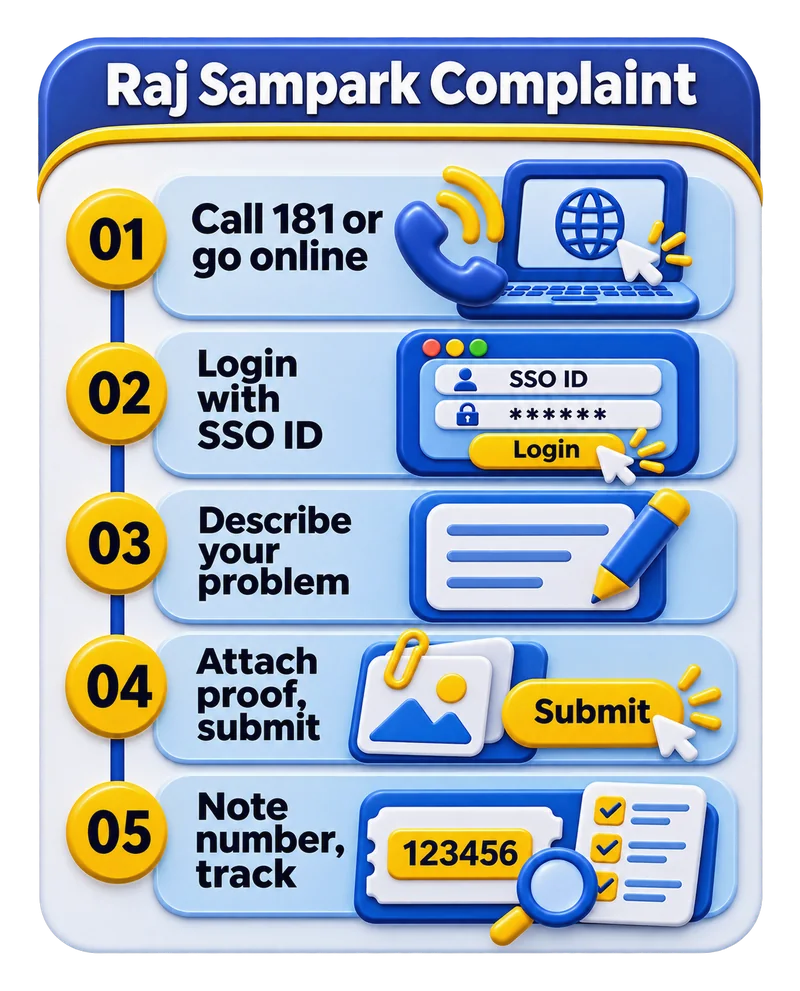
For a Rajsampark complaint, call the 181 helpline or sign in through sso.rajasthan.gov.in, open the Raj Sampark app and submit your grievance with clear details and any proof. Filing takes only a few minutes, and you get a reference number that you use to track your complaint later.
Dear users, this page explains what Rajasthan Sampark (Raj Sampark 2.0) is, the two main ways to file a complaint, how to write one that gets action, how to track it, and the official helpline numbers listed on the SSO portal. We are an independent guide, not the government portal. Always type the official address yourself, and never share your password or OTP with anyone who calls about your complaint.
Steps checked on the official portal on 4 November 2026. Independent guide — not the Government of Rajasthan.
What Is Raj Sampark (Rajasthan Sampark)?
Raj Sampark, also written as “Rajasthan Sampark” or “rajsampark”, is the state’s public grievance redressal system. It lets residents raise problems with government departments and follow them up in one place.
On the official SSO helpdesk page (checked 4 November 2026), it is listed as “RAJ SAMPARK 2.0”, with the phone numbers 181 and 0141-2921375 and the email [email protected]. That listing means Raj Sampark 2.0 is one of the apps connected to the Rajasthan Single Sign On system, so you can reach it with the same SSO ID you use for other state services.
People use Raj Sampark for many kinds of public service problems, for example a delay in a government service, a pending application, issues with a local office, or a scheme benefit that has not arrived. The department concerned is expected to look into the complaint and update its status.
Raj Sampark is for grievances about government services. For an emergency, contact the emergency services directly. For a court case or a private dispute, Raj Sampark is not the right channel.
Two Ways to File a Rajsampark Complaint
You can choose the phone route or the online route. Both create a complaint that can be tracked.
181 Helpline
Call 181 and explain your problem to the operator. They register the complaint for you. This is useful if you are not comfortable with online forms.
Online Through SSO
Log in to the SSO portal, open the Raj Sampark app and fill in the complaint yourself. You can attach documents and keep a full record on your account.
Office Landline
The SSO helpdesk also lists 0141-2921375 for Raj Sampark 2.0. You can use it for questions about the system during working hours.
For written queries about the Raj Sampark system, the listed email is [email protected]. Include your complaint number if you already have one.
How to File a Rajsampark Complaint Online
These are the general steps. The SSO login screens were checked on 4 November 2026. Screens inside Raj Sampark are managed by the department and may change, so follow the labels you see on screen.
Step 1: Open the Official SSO Portal
Type sso.rajasthan.gov.in yourself in your browser. You will see “Rajasthan Single Sign On” and an English and हिन्दी language toggle at the top.
Step 2: Log In With Your SSOID
Enter “Digital Identity (SSOID/ Username)”, “Password” and the captcha, then click “Login”. If you do not have an SSO ID, create one first with our SSO ID registration guide.
Step 3: Open the Raj Sampark App
On your dashboard, find the Raj Sampark tile among your citizen apps and click it. It opens using your SSO session, so you do not need a separate password.
Step 4: Choose the Option to Register a Grievance
Inside Raj Sampark, select the option for a new complaint or grievance. Your basic details may already be filled in from your SSO profile. Check them.
Step 5: Describe the Problem Clearly
Select the department or category that best matches your issue, then write what happened, where, since when, and what you want done. Add application numbers, dates and office names if you have them.
Step 6: Attach Proof and Submit
Attach supporting documents such as a receipt, application acknowledgement or photo, if the form allows. Submit, then note down or screenshot the complaint number shown. You will need it for tracking.
How to Write a Complaint That Gets Action
- One issue per complaint: Do not mix three different problems in one complaint. File them separately so each reaches the right office.
- Right department: Pick the department or category that actually handles your problem. A wrong choice can slow things down.
- Exact details: Include your application or account number, the office name, the village or ward, and the dates involved.
- What you want: Say what result you expect, for example “release my pending payment” or “issue my certificate”.
- Polite and factual: Write calmly and stick to facts. Avoid abusive language, which can delay handling.
- Proof attached: Attach receipts, acknowledgements or photos where possible. Keep the originals safe.
- Correct mobile number: Make sure the mobile number on your profile is yours, since updates may be sent to it.
How to Track Your Raj Sampark Complaint Status
- Step 1: Log in at sso.rajasthan.gov.in and open the Raj Sampark app again.
- Step 2: Go to your complaints or the status option shown in the app.
- Step 3: Find your complaint using the complaint number.
- Step 4: Read the current status and any reply or remark from the department.
- Step 5: If you filed by phone, you can call 181 again and quote your complaint number to ask for the status.
Keep your complaint number safe. The general tracking steps are:
If the reply does not solve your problem, read the remark carefully. Raj Sampark may offer an option to give feedback or raise the matter again; use the option shown on screen rather than filing many duplicate complaints.
Common Rajsampark Problems and Fixes
Many problems with Raj Sampark online are actually SSO login problems. Fix those first.
I cannot log in to the SSO portal.
Check your SSOID, password and captcha. If you forgot your SSOID, send “RJ SSO” to 9223166166 from your registered mobile. For the password, send “RJ SSO PASSWORD” to 9223166166. See our forgot SSO ID guide.
The Raj Sampark app is not on my dashboard.
Look through your citizen apps carefully. If it is missing, log out, clear your browser cache and log in again. You can also file by calling 181.
I lost my complaint number.
Log in and check your complaint list in the Raj Sampark app. If you filed by phone, call 181 with your mobile number and details so they can look it up.
The 181 line is busy.
Try again later, or file online through SSO instead. You can also email [email protected] for questions about the system.
Someone called asking for my OTP to “close” my complaint.
Do not share it. Real helpdesk staff do not need your password or OTP. Report such calls and see our fake SSO websites guide for safety tips.
My complaint was closed but the problem remains.
Read the department’s remark. Use any feedback option shown, or contact 181 with your complaint number and explain why the issue is not resolved.
Raj Sampark Helpline Number and Email
These contacts are listed on the official SSO helpdesk page (checked 4 November 2026).
| App | Phone | |
|---|---|---|
| RAJ SAMPARK 2.0 | 181, 0141-2921375 | [email protected] |
The general SSO helpdesk works on working days from 10 AM to 6 PM. For SSO account problems rather than complaints, use your district RajSSO helpdesk on our SSO ID helpline number page.
हिंदी में जानकारी
राज संपर्क (Raj Sampark 2.0) राजस्थान सरकार की जन शिकायत प्रणाली है। शिकायत दर्ज करने के लिए 181 हेल्पलाइन पर कॉल करें, या sso.rajasthan.gov.in पर लॉगिन करके Raj Sampark ऐप खोलें और शिकायत भरें। अपनी समस्या साफ़ लिखें, सही विभाग चुनें और रसीद या आवेदन की प्रति जैसे सबूत जोड़ें। शिकायत संख्या नोट करें और उसी ऐप में या 181 पर कॉल करके स्टेटस देखें। SSO हेल्पडेस्क पेज पर राज संपर्क के लिए 181, 0141-2921375 और ईमेल [email protected] दिए गए हैं। किसी को भी अपना पासवर्ड या OTP न बताएँ।
FAQs

Conclusion
Rajsampark makes it easier to raise a problem with any state department: call 181, or log in at sso.rajasthan.gov.in, open Raj Sampark, describe your issue clearly and keep the complaint number. Track it regularly and reply quickly if more details are asked for.
For help with the system, use 181, 0141-2921375 or [email protected]. For login trouble, see our SSO ID problems page. Always type the official address yourself and never share your password or OTP.