SSO ID Helpline Number 2026: District-wise RajSSO Helpdesk List
Find the right RajSSO helpdesk phone number and email for your district or for the app you are using, with tips to get your problem solved on the first call.
The SSO ID helpline number depends on your district: every district in Rajasthan has its own RajSSO helpdesk phone and email, and most numbers follow the pattern 0141-29292XX (for example, Ajmer is 0141-2929201 and Jaipur is 0141-2928239). Call on working days between 10 AM and 6 PM, or email your district helpdesk with your SSOID and a screenshot of the error.
If your problem is with a specific service inside SSO, such as e-Mitra, RajKaj, Jan Aadhaar or a recruitment form, the app’s own helpdesk is usually faster. Below you will find both lists. Numbers as listed on the official helpdesk page on 4 November 2026.
Steps checked on the official portal on 4 November 2026. Independent guide — not the Government of Rajasthan.
Where the Official SSO Helpdesk List Is
The official list of SSO helpdesk numbers is published on the Rajasthan SSO portal itself, on the helpdesk page.
To see it, type sso.rajasthan.gov.in/helpdesk in your browser’s address bar yourself. The page shows the district RajSSO helpdesks and a long list of application helpdesks (the full list has close to 500 entries), each with a phone number and an email address.
Dear users, please always type the official address yourself rather than tapping links from WhatsApp messages or unknown websites. ssoidguide.net is an independent guide, not the government portal, and we never ask for your password or OTP.
Helpdesk numbers can change. If a number below does not connect, open sso.rajasthan.gov.in/helpdesk to check the latest list.
District-wise RajSSO Helpdesk Numbers and Emails
Use your district RajSSO helpdesk for login, registration, SSOID, password and profile problems. The list covers all 41 districts shown on the portal, in alphabetical order.
| District | Phone | |
|---|---|---|
| Ajmer | 0141-2929201 | [email protected] |
| Alwar | 0141-2929202 | [email protected] |
| Balotra | 0141-2929203 | [email protected] |
| Banswara | 0141-2929204 | [email protected] |
| Baran | 0141-2929205 | [email protected] |
| Barmer | 0141-2929206 | [email protected] |
| Beawar | 0141-2929207 | [email protected] |
| Bharatpur | 0141-2929208 | [email protected] |
| Bhilwara | 0141-2929209 | [email protected] |
| Bikaner | 0141-2929210 | [email protected] |
| Bundi | 0141-2929211 | [email protected] |
| Chittorgarh | 0141-2929212 | [email protected] |
| Churu | 0141-2929213 | [email protected] |
| Dausa | 0141-2929214 | [email protected] |
| Deeg | 0141-2929216 | [email protected] |
| Dholpur | 0141-2929217 | [email protected] |
| Didwana-Kuchaman | 0141-2929215 | [email protected] |
| Dungarpur | 0141-2929218 | [email protected] |
| Hanumangarh | 0141-2929219 | [email protected] |
| Jaipur | 0141-2928239 | [email protected] |
| Jaisalmer | 0141-2929220 | [email protected] |
| Jalore | 02973-64027 | [email protected] |
| Jhalawar | 0141-2929222 | [email protected] |
| Jhunjhunu | 0141-2929223 | [email protected] |
| Jodhpur | 0141-2929224 | [email protected] |
| Karauli | 0141-2929225 | [email protected] |
| Khairthal-Tijara | 0141-2929226 | [email protected] |
| Kota | 0141-2929227 | [email protected] |
| Kotputli-Behror | 0141-2929228 | [email protected] |
| Nagaur | 0141-2929229 | [email protected] |
| Pali | 0141-2929230 | [email protected] |
| Phalodi | 0141-2929231 | [email protected] |
| Pratapgarh | 0141-2929232 | [email protected] |
| Rajsamand | 0141-2929233 | [email protected] |
| Salumbar | 0141-2929234 | [email protected] |
| Sawai Madhopur | 0141-2929238 | [email protected] |
| Sikar | 0141-2929235 | [email protected] |
| Sirohi | 0141-2929236 | [email protected] |
| Sri Ganganagar | 0141-2929237 | [email protected] |
| Tonk | 0141-2929239 | [email protected] |
| Udaipur | 0141-2929240 | [email protected] |
Most district numbers start with 0141 (the Jaipur STD code) even for districts far from Jaipur. Jalore is the exception on the list, with 02973-64027. Numbers as listed on the official helpdesk page on 4 November 2026.
App-wise SSO Helpdesk Numbers (Most Searched)
If you can log in to SSO but a particular app is giving trouble, contact that app’s helpdesk. These are the services people search for most, as shown on the portal’s helpdesk page.
The portal writes the e-Mitra numbers with the +91 prefix (+91141-2922238). From a mobile you can dial either 0141-2922238 or +91 141 2922238.
For recruitment, pick the number for the body conducting your exam: RPSC for Rajasthan Public Service Commission exams, RSSB for Rajasthan Staff Selection Board exams, and the “Other” number for other recruitments on the portal. Our RPSC SSO login guide and SSO admit card guide cover the most common recruitment questions.
| App / Service | Phone | |
|---|---|---|
| e-Mitra (also e-Mitra MIS, Reports, EmitraPlus) | 0141-2922238, 0141-2922241 | [email protected] |
| Raj Kaj (e-Office, HRMS, eFile, IPR, PAR/ACR) | 0141-2921304, 0141-2922281, 0141-2921149 | [email protected] |
| Jan Aadhaar | 0141-2850287 | [email protected] |
| Jan Aadhaar DBT Engine | 0141-2850287, 0141-2923377 | [email protected] |
| Recruitment Portal | RPSC: 0145-2635200; RSSB: 0141-2722520; Other: 9352323625 | [email protected] |
| Rajasthan Government Health Scheme (RGHS) | 0141-2740252 | [email protected] |
| IFMS / IFMS 3.0 | 0141-2924501 | [email protected] |
| Scholarship (CE) | 18001806127 | [email protected] |
| Scholarship (SJE) | 0141-2226638 | [email protected] |
| Raj Sampark 2.0 | 181, 0141-2921375 | [email protected] |
| Employment Exchange (EEMS) | 0141-2368850 | [email protected] |
| RajSSO and Email services (email request) | 0141-2925556 | [email protected] |
Which SSO Helpdesk Should You Contact?
Calling the right desk first saves a lot of time. Use this quick guide.
- Cannot log in, forgot SSOID or password: Try self-service first (Forgot SSO ID or password reset), then call your district RajSSO helpdesk.
- Two or more SSOIDs: See our merge SSO ID guide; if that does not work, contact your district helpdesk.
- e-Mitra kiosk or service issue: e-Mitra helpdesk (0141-2922238 / 0141-2922241).
- Government employee app (RajKaj, IFMS, RGHS): the app helpdesk in the table above.
- Exam form, fee or admit card: Recruitment Portal helpdesk (RPSC, RSSB or Other).
- Scholarship application: Scholarship CE (toll-free 18001806127) or SJE helpdesk, depending on the scheme.
- Complaint or grievance: Raj Sampark 181.
- Official mail.rajasthan.gov.in email request: RajSSO and Email services, 0141-2925556.
How to Contact the SSO Helpdesk Effectively
Helpdesk staff handle many calls a day. Having the right details ready means your problem can be checked quickly, often in a single call or email.
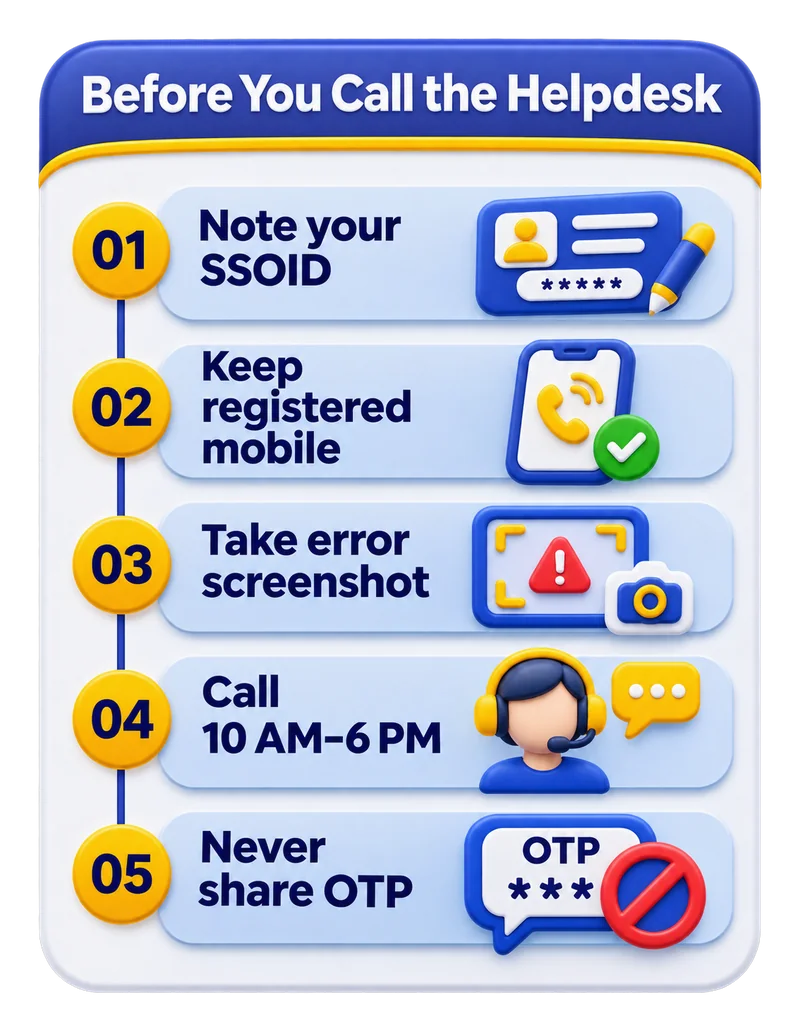
Step 1: Call at the Right Time
The portal lists helpdesk timing as working days, 10 AM to 6 PM. Lines are usually busiest in the morning and near exam form deadlines, so try mid-afternoon if you cannot get through.
Step 2: Keep Your SSOID Ready
Note down your SSOID (Digital Identity) exactly as it appears. If you have forgotten it, recover it first by sending “RJ SSO” to 9223166166 from your registered mobile.
Step 3: Keep Your Registered Mobile Nearby
Many checks depend on the mobile number linked to your SSOID. Call from that number if possible, or keep it next to you.
Step 4: Take a Screenshot of the Error
A screenshot of the exact error message, with the date and time visible, explains the problem better than any description. Attach it when you email.
Step 5: Write a Clear Email
Use a short subject such as “SSOID login error – [your SSOID] – [district]”. In the body, write your name, SSOID, district, registered mobile, what you tried and the exact error. One clear email is better than many short ones.
Step 6: Never Share Your Password or OTP
Genuine helpdesk staff do not need your password or OTP. If anyone asks for them, or asks for money to “unlock” your ID, end the call.
The helpdesk cannot change exam results, extend deadlines or approve applications. For those, contact the department running the scheme or exam.
Common Helpdesk Problems
The helpline number is always busy.
Try again later in the afternoon on a working day, and avoid the last days of exam form deadlines. Meanwhile, send an email to your district helpdesk with your SSOID and a screenshot so your request is already in queue.
Nobody picks up on a holiday or Sunday.
The portal lists the helpdesks for working days, 10 AM to 6 PM. Call again on the next working day or send an email.
My district is not on the list.
Some districts were newly created. Check the latest list on sso.rajasthan.gov.in/helpdesk, or contact the helpdesk of the district your area belonged to earlier.
I did not get a reply to my email.
Check your spam folder first. If several working days pass, reply on the same email thread (do not start a new one) and add a polite reminder with your SSOID.
Someone called me from “SSO helpdesk” asking for my OTP.
Do not share it. Helpdesk staff never need your OTP or password. If you think your account is at risk, change your password through the official portal.
हिंदी में जानकारी
SSO ID हेल्पलाइन नंबर हर जिले के लिए अलग है। ज़्यादातर जिलों के नंबर 0141-29292XX जैसे हैं, जैसे अजमेर 0141-2929201 और जयपुर 0141-2928239। हेल्पडेस्क कार्य दिवसों में सुबह 10 बजे से शाम 6 बजे तक उपलब्ध है। कॉल या ईमेल करते समय अपनी SSOID, रजिस्टर्ड मोबाइल नंबर और एरर का स्क्रीनशॉट तैयार रखें। ई-मित्र, राजकाज, जन आधार या भर्ती पोर्टल की समस्या के लिए उस ऐप की हेल्पडेस्क से संपर्क करें। अपना पासवर्ड या OTP कभी किसी को न बताएं।
FAQs
Conclusion
Dear users, the fastest way to get SSO help is to contact the right desk: your district RajSSO helpdesk for login and SSOID issues, and the app helpdesk for e-Mitra, RajKaj, Jan Aadhaar, scholarship or recruitment problems. Call on working days between 10 AM and 6 PM, keep your SSOID, registered mobile and an error screenshot ready, and never share your password or OTP. If you are stuck at login, first try the fixes in our SSO ID problems guide.