
How to Delete SSO ID in 2026: Close or Deactivate Your Rajasthan SSOID
The official portal does not show a “delete account” button. Here is what you can do instead: stop using the ID safely, merge duplicates and ask your district helpdesk for help.
If you are searching how to delete SSO ID, the honest answer for 2026 is that the official portal does not offer a self-service “delete” or “deactivate” button: when we checked sso.rajasthan.gov.in on 4 November 2026, its sign-in page, sitemap and website policies did not mention deleting or closing an account. What you can do is secure the ID, stop using it, merge a duplicate where that applies, and ask your district RajSSO helpdesk about your case.
Dear users, people usually want to close an SSO ID because they made two IDs by mistake, they worry someone else knows the password, or they simply no longer need it. In this guide we explain each situation, the safe steps you can take today, and what to ask the helpdesk. This is an independent guide, not the government portal, and we will never ask for your password or OTP.
Steps checked on the official portal on 4 November 2026. Independent guide — not the Government of Rajasthan.
Can You Delete SSO ID? What the Portal Shows
Before you look for a hidden option, here is what we found on the official pages. Steps checked on 4 November 2026.
The Rajasthan Single Sign On portal is one digital identity used across hundreds of government applications. On 4 November 2026 the sign-in page showed 431 G2G apps, 272 G2C/G2B apps and 34,482,130 identities. Your SSOID may be linked to exam applications, scholarships, e-Mitra services, job records or employee services, so it is not a simple social media account.
The public pages of the portal list Login, Registration, Forgot SSOID, Forgot Password, Helpdesk Details, Website Policies, Password Policy and Sitemap. None of them mention deleting, deactivating or closing an SSO ID, and the Website Policies page does not cover account termination. So we cannot tell you of any official “delete SSO ID” button, and you should be careful with any page or person claiming to delete it for a fee.
If you truly need an ID closed, the right place to ask is the official RajSSO helpdesk for your district. They can tell you what is possible for your type of account.
Do not pay anyone who offers to “delete” or “deactivate” your SSO ID. Deleting is not shown as a service on the portal, and such offers can be a way to collect your login details.
Why People Want to Close an SSO ID
The best action depends on your reason. Find your situation below.
I made two SSO IDs by mistake.
Do not try to delete one yourself. Decide which ID holds your important records, keep using that one, and read our merge SSO ID guide to see how duplicates are handled. Ask your district helpdesk if you are unsure which one to keep.
Someone else may know my password.
Deleting is not the fix. Log in on sso.rajasthan.gov.in and change your password at once, or use sso.rajasthan.gov.in/forgot if you cannot log in. Then follow the security steps on this page.
My registered mobile number is lost or changed.
Update the number rather than closing the ID, because recovery depends on it. See SSO ID mobile number change.
I do not need the SSO ID any more.
You can simply stop using it after securing it. Keep a note of your SSOID, because certificates, applications or records linked to it may be needed again later.
A cyber café or agent made the ID and still has the password.
Reset the password yourself using your registered mobile, then log out from the shared computer. Never let anyone else keep your login details.
I am a government employee who has left service or retired.
Employee IDs are tied to official records and services. Ask your office or district RajSSO helpdesk what happens to the account; do not try to close it on your own.
Secure Your SSO ID Before You Stop Using It
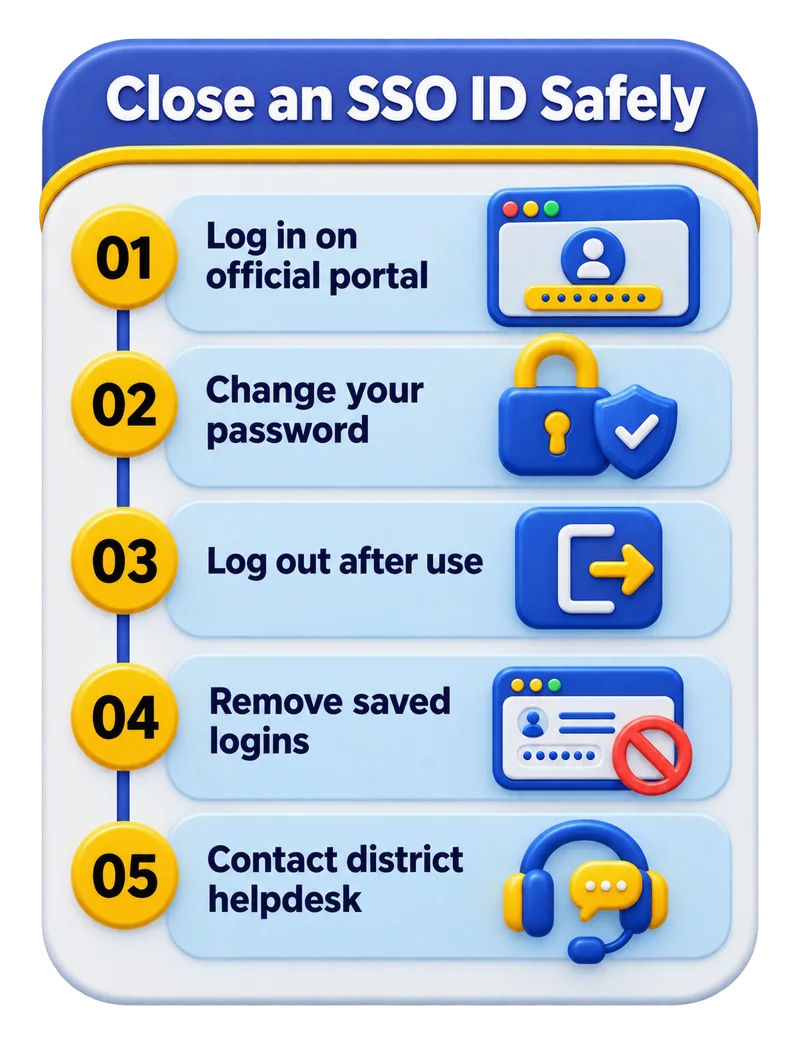
Since you cannot press “delete”, the safest alternative is to lock the account down so only you can use it. Follow these steps.
Step 1: Open the Official Portal Yourself
Type sso.rajasthan.gov.in/signin in your browser. Check that the page reads “Rajasthan Single Sign On” and that the address ends in .rajasthan.gov.in.
Step 2: Change to a New, Strong Password
Log in with your “Digital Identity (SSOID/ Username)”, password and captcha, then change your password from your account. If you cannot log in, use sso.rajasthan.gov.in/forgot or send “RJ SSO PASSWORD” to 9223166166 from your registered mobile. Our SSO ID password reset guide explains every route.
Step 3: Check Your Registered Mobile Number
Make sure the mobile number on the account is yours and still active. Password and SSOID recovery by SMS only works from the registered mobile.
Step 4: Log Out and Clear Saved Logins
Log out on every device you used. In your browser’s settings, delete any saved SSO password and clear cookies for the site, especially on shared or cyber café computers.
Step 5: Remove Shortcuts and Notes
Delete bookmarks, screenshots or notes that show your password. If you shared your login with an agent, the new password from Step 2 shuts them out.
Step 6: Contact the Helpdesk if Needed
If you still want the ID closed, or you see activity you did not do, contact your district RajSSO helpdesk on a working day between 10 AM and 6 PM.
Write your SSOID down in a safe place even if you stop using it. Many people later need old admit cards, results or certificates linked to the same identity.
Duplicate SSO IDs: Merge Instead of Delete
Having two SSO IDs is a common reason people search “close sso id”. It often happens when someone registers once with Jan Aadhaar and again with Google, or forgets the first SSOID and creates a fresh one.
Deleting the wrong one could leave your exam forms, scholarship records or job applications on an ID you can no longer open. That is why it is better to first find out which ID holds which records. Use sso.rajasthan.gov.in/forgotsd to recover an old SSOID, then compare what each ID contains.
The steps for handling duplicates are covered in our merge SSO ID guide. If your case is not covered there, ask your district helpdesk which ID to keep.
Contact the District RajSSO Helpdesk
The portal’s helpdesk page lists a phone number and email for each district. Helpdesks work on working days from 10 AM to 6 PM. Prepare these details before you contact them.
- Your SSOID: The ID you want closed or checked (never share your password).
- Registered mobile: The number linked to the account.
- Account type: Citizen, Udhyog or Govt. Employee, and whether you registered with Jan Aadhaar, Aadhaar or Google.
- Your reason: Duplicate ID, lost access, security worry or no longer needed.
- Second ID (if any): The other SSOID, if you have a duplicate.
- District: Contact the helpdesk of your own district, for example Jaipur 0141-2928239 ([email protected]) or Jodhpur 0141-2929224 ([email protected]).
A genuine helpdesk will not ask for your password or OTP. If anyone does, end the call.
हिंदी में जानकारी
4 नवंबर 2026 को जांच के समय SSO पोर्टल पर SSO ID डिलीट या बंद करने का कोई स्व-सेवा विकल्प नहीं दिखा। अगर आप ID बंद करना चाहते हैं, तो पहले sso.rajasthan.gov.in पर लॉगिन करके पासवर्ड बदलें, सभी डिवाइस से लॉग आउट करें और ब्राउज़र में सेव पासवर्ड हटा दें। दो SSO ID बन गई हैं तो किसी को डिलीट करने के बजाय पहले देखें कि आपके रिकॉर्ड किस ID पर हैं और merge की जानकारी लें। ज़रूरत हो तो कार्य दिवसों में सुबह 10 से शाम 6 बजे तक अपने ज़िले के RajSSO हेल्पडेस्क से संपर्क करें। SSO ID डिलीट करने के नाम पर पैसे मांगने वाले किसी व्यक्ति या वेबसाइट पर भरोसा न करें और पासवर्ड या OTP किसी को न बताएं।
FAQs
Conclusion
There is no self-service way to delete or deactivate an SSO ID shown on the official portal in 2026. Instead, secure the ID with a new password, log out everywhere, remove saved logins and keep your SSOID noted for the future.
For duplicate IDs, read our merge SSO ID guide before doing anything. For any special request, contact your district RajSSO helpdesk using our SSO ID helpline number page, and never pay anyone who promises to delete your ID.