RGHS Login 2026: Rajasthan Government Health Scheme Guide
RGHS is the Rajasthan Government Health Scheme for state government employees, pensioners and their families. Employees usually reach it by signing in to the SSO portal and opening the RGHS app from their dashboard.
For RGHS login, open sso.rajasthan.gov.in, sign in with your SSOID, password and captcha, and click the RGHS (Rajasthan Government Health Scheme) app on your dashboard to see your registration, family members and card details. It usually takes a minute or two, and you use your normal SSO password; there is no separate RGHS password to remember.
Dear users, this guide explains what RGHS is at a simple level, who it is meant for, how to reach your RGHS card or beneficiary details, the usual login problems and the official RGHS helpdesk number. We are an independent guide, not the government portal. Always type the official address yourself, and never share your password or OTP with anyone, including people who call claiming to be from RGHS.
Steps checked on the official portal on 4 November 2026. Independent guide — not the Government of Rajasthan.
What Is RGHS (Rajasthan Government Health Scheme)?
RGHS stands for Rajasthan Government Health Scheme. It is the state’s health scheme for its own employees, pensioners and their eligible family members, and it is listed as an app on the SSO portal.
The SSO portal’s helpdesk page names it “Rajasthan Government Health Scheme (RGHS)”. Its support email ([email protected]) is an SIPF address, linked with the State Insurance & Provident Fund department, which handles insurance and provident fund matters for state employees. You can read more about that department in our SIPF portal guide.
In simple terms, RGHS lets eligible members get medical treatment and medicines through the scheme instead of handling every bill on their own. The exact benefits, eligible categories, contribution rules and hospital lists are set by the government and can change, so check them on the official RGHS pages or with your office. We could not open the official RGHS website on 4 November 2026, so we do not list rates, limits or hospital names here.
Who Is RGHS For?
RGHS is not a general public scheme. It is meant for people connected with state government service. Your office or pension office can confirm whether you are covered.
Serving State Employees
Rajasthan government employees are the main users. They usually access RGHS through their Govt. Employee SSO ID.
Pensioners
Retired state employees covered by the scheme also use RGHS. Their access route and documents may differ from serving staff, so check with the pension office if unsure.
Eligible Family Members
Dependent family members can be added as beneficiaries under the employee or pensioner, as allowed by the scheme rules.
Other Notified Categories
The government may cover other categories by notification. Only an official notice or your office can confirm this.
Hospitals and Pharmacies
Empanelled hospitals and medical stores have their own roles in the system. This guide focuses on employees and pensioners.
Not for General Citizens
Ordinary residents are not covered by RGHS. For citizen services, start with our SSO ID login guide.
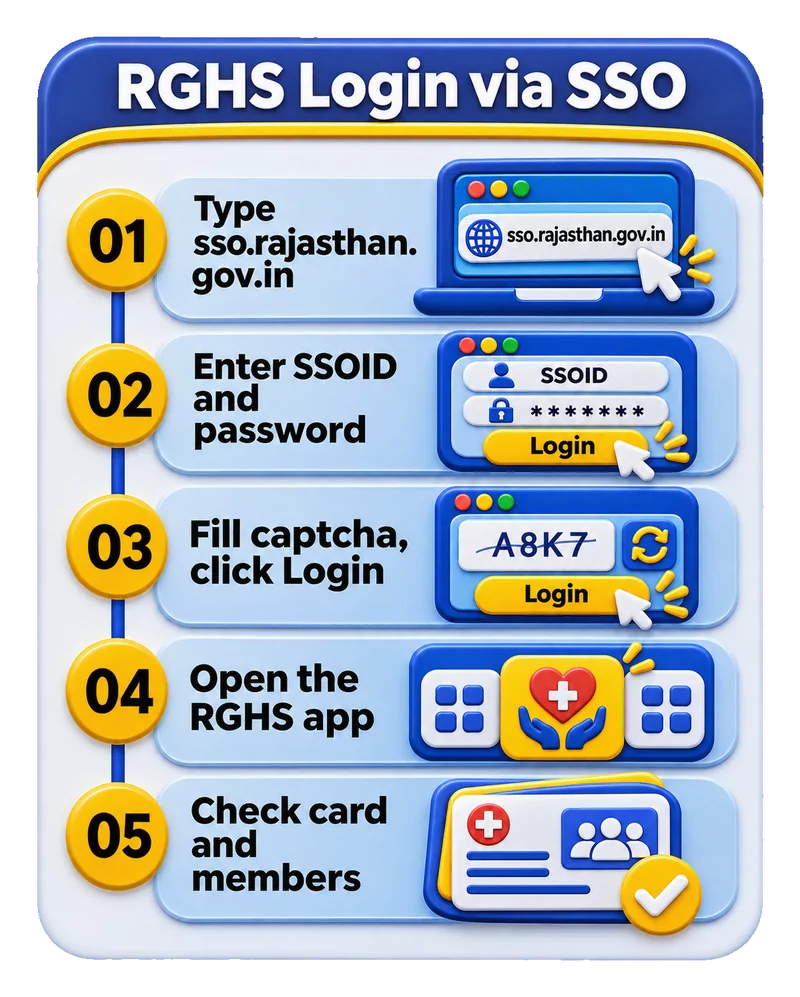
How to Do RGHS Login Through SSO
The RGHS SSO login follows the same flow as other SSO apps. Steps checked on 4 November 2026 on the SSO portal. Screens inside RGHS depend on your role and may change.
Step 1: Open the Official SSO Portal
Type sso.rajasthan.gov.in yourself in Chrome or another updated browser. The page shows “Rajasthan Single Sign On” and “One Digital Identity for all Applications”. Do not use RGHS login links shared on WhatsApp or found on unknown sites.
Step 2: Enter Your SSOID and Password
Fill “Digital Identity (SSOID/ Username)” and “Password”. Serving employees should use the SSOID created under the Govt. Employee tab, because that is the one linked to their service record.
Step 3: Fill the Captcha and Click Login
Type the characters in “Enter Captcha”. Use the refresh icon or audio icon if the image is unclear, then click “Login”.
Step 4: Open the RGHS App
On your SSO dashboard, look for the RGHS app tile. If you have many apps, scroll carefully or use any search box the dashboard offers.
Step 5: Check Your Registration and Family Details
Inside RGHS, review your own details and the family members added as beneficiaries. Check names, dates of birth and relationships carefully, because wrong details can cause trouble at the hospital.
Step 6: View or Download Your Card Details
Look for the option that shows your RGHS card or beneficiary details and save or print it if the app offers that. Then log out of RGHS and the SSO portal.
Menu names inside RGHS can change. If you cannot find the card or family option, do not guess or pay an agent. Contact the RGHS helpdesk listed below or your office.
RGHS Card Download: What to Keep in Mind
Many people search “rghs card download” before a hospital visit. Here is what to check.
- Use your own login: Download the card only from your own SSO account. Do not ask strangers or shops to do it with your password.
- Check each member: Every family member listed should have the correct name and details before you rely on the card.
- Keep a copy on your phone: A saved copy or screenshot helps at the hospital, but follow whatever identity proof the hospital asks for.
- Update changes quickly: Births, marriages and other changes in family details should be updated through the proper process as early as possible.
- Watch for fake apps: Only use the RGHS app reached from sso.rajasthan.gov.in or official RGHS pages you typed yourself. See our fake SSO websites page.
Common RGHS Login Problems and Fixes
Most RGHS login trouble is an SSO problem, an app mapping problem or a record mismatch. Here are the usual ones.
The RGHS app is not showing on my SSO dashboard.
You may have logged in with a citizen SSOID instead of your Govt. Employee ID. Log in with your employee ID. If the app is still missing, ask your office or email the RGHS helpdesk at [email protected] with your SSOID and department.
I forgot my SSOID.
Use “I Forgot my Digital Identity (SSOID). Click Here” and pick the type you registered with, or send “RJ SSO” to 9223166166 from your registered mobile. See our forgot SSO ID page.
I forgot my SSO password.
Use “I Forgot my Password. Click Here” and reset by mobile or personal email, or send “RJ SSO PASSWORD” to 9223166166 from your registered mobile. Full steps are in our SSO password reset guide.
The SMS method says no record found.
The forgot options work only if you logged in to SSO at least once on or after 07/09/2018. Otherwise contact your district RajSSO helpdesk.
A family member’s name or details are wrong.
Corrections usually need to go through your office or the RGHS process with proper documents. Contact the RGHS helpdesk to learn the right route for your case.
The hospital says my card is not active.
Check your registration status in the RGHS app and confirm it with your office. Then call the RGHS helpdesk on 0141-2740252 with your details.
The RGHS page is slow or blank.
Clear your browser cache, close extra tabs and log in again from the SSO portal. Try at a quieter time of day. If it continues, note the error and contact the helpdesk.
RGHS Helpline Number and Email
The SSO portal’s helpdesk page lists one official contact for RGHS. Checked on the SSO helpdesk page on 4 November 2026. The SSO helpdesk works on working days from 10 AM to 6 PM.
| App | Phone | |
|---|---|---|
| Rajasthan Government Health Scheme (RGHS) | 0141-2740252 | [email protected] |
When you write to RGHS, include your name, SSOID, employee or pension ID, department and a screenshot of the problem. Never send your password or OTP by phone or email. For SSO account issues, see our SSO ID helpline number page.
हिंदी में जानकारी
RGHS यानी राजस्थान गवर्नमेंट हेल्थ स्कीम राज्य सरकार के कर्मचारियों, पेंशनरों और उनके पात्र परिवारजनों के लिए स्वास्थ्य योजना है। RGHS लॉगिन के लिए sso.rajasthan.gov.in खोलें, अपनी SSOID, पासवर्ड और कैप्चा भरकर Login करें और डैशबोर्ड पर RGHS ऐप पर क्लिक करें। वहां आप अपना पंजीकरण, परिवार के सदस्य और कार्ड विवरण देख सकते हैं। अगर ऐप न दिखे तो अपनी कर्मचारी SSOID से लॉगिन करें और कार्यालय से संपर्क करें। RGHS हेल्पडेस्क: 0141-2740252, ईमेल [email protected]। अपना पासवर्ड या OTP किसी को न बताएं।
FAQs
Conclusion
RGHS login is straightforward: sso.rajasthan.gov.in, your SSOID and password, captcha, Login, then the RGHS app. From there you can check your registration, family members and card details before a hospital visit.
If the app is missing, log in with your Govt. Employee ID and ask your office for access. For scheme-related issues, call the RGHS helpdesk on 0141-2740252 or email [email protected]. Our employee SSO login guide covers the employee ID side in more detail. Stay safe and never share your password or OTP.