
RajKaj Login 2026: Open Raj Kaj e-Office Through Your SSO ID
RajKaj is Rajasthan’s Integrated e-Office Suite for government employees. You do not need a separate password: you open it from your SSO ID dashboard after a normal SSO login.
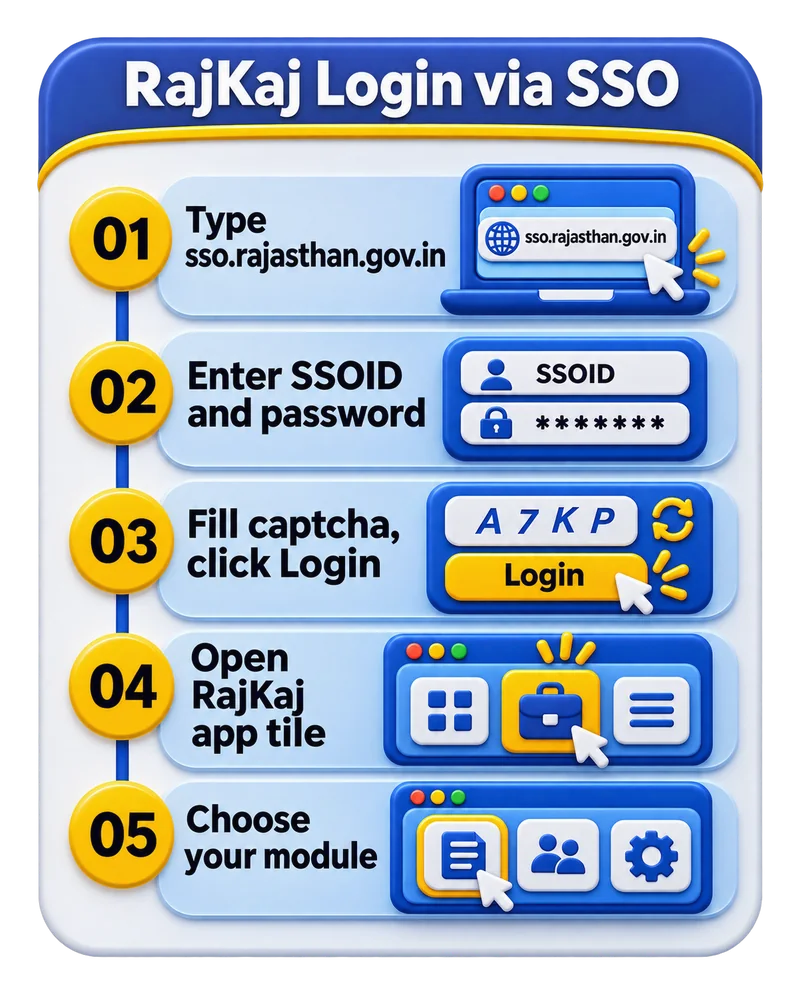
For RajKaj login, open sso.rajasthan.gov.in, sign in with your government employee SSOID, password and captcha, then click the RajKaj app on your SSO dashboard. It usually takes less than a minute, and the same SSO password works for RajKaj. There is no separate RajKaj password to remember.
Dear users, this guide explains what RajKaj is, who uses it, the exact sign-in fields you will see, the most common errors and how to fix them, and the official RajKaj helpdesk numbers. We are an independent guide, not the government portal, so always type the official address yourself and never share your password or OTP with anyone.
Steps checked on the official portal on 4 November 2026. Independent guide — not the Government of Rajasthan.
What Is RajKaj?
RajKaj (also written Raj Kaj) is the Integrated e-Office Suite of the Government of Rajasthan. It moves everyday office work such as files, staff records and appraisals from paper to a single online system.
The SSO portal’s own helpdesk list names it “Raj Kaj (Rajasthan’s Integrated e-Office Suite)”. The same list shows several RajKaj modules that run as separate apps under one support team: RajKaj eFile Audit, RajKaj HRMS, RAJKAJ IPR v1 and RAJKAJ PAR/ACR v1. In simple words, eFile handles office files and notings, HRMS covers employee service records, IPR relates to immovable property returns, and PAR/ACR relates to annual performance and confidential reports.
RajKaj is meant for government offices and their employees. It is part of the Rajasthan Single Sign On system, which on 4 November 2026 listed 431 G2G (government-to-government) apps. That is why you reach it through your SSO ID rather than through a separate login page.
Who Uses RajKaj?
RajKaj is a work tool for people inside government. Here is who typically opens it and why.
Government Employees
Staff in state departments use RajKaj to work on e-files, check their service details and complete forms like property returns and appraisal reports.
Section Officers and Clerks
Office staff create, forward and track files in eFile instead of moving paper folders from desk to desk.
Reporting and Reviewing Officers
Senior officers use the PAR/ACR module to write and review performance reports for staff working under them.
Department HR Cells
HR teams maintain employee records in the HRMS module, which keeps postings and service details in one place.
New Joiners
Newly appointed employees usually need an SSO ID created under the Govt. Employee category before RajKaj access can be set up for them.
Not for General Citizens
Citizens looking for certificates, bill payments or scheme applications should use e-Mitra or other citizen apps instead. See our e-Mitra login guide.
How to Do RajKaj SSO Login Step by Step
The RajKaj SSO login follows the same flow as any SSO app. Steps checked on 4 November 2026. Menu names inside RajKaj may differ slightly by department and role.
Step 1: Open the Official SSO Portal
Type sso.rajasthan.gov.in yourself in Chrome or any updated browser. Do not click RajKaj login links sent on WhatsApp or found on unknown websites. The portal shows “Rajasthan Single Sign On” with the tagline “One Digital Identity for all Applications”.
Step 2: Enter Your SSOID and Password
On the Login page, fill “Digital Identity (SSOID/ Username)” with your employee SSOID and type your password in the “Password” box. Use the same SSOID that your department has linked to RajKaj, not a separate citizen SSOID.
Step 3: Fill the Captcha and Click Login
Type the characters shown in “Enter Captcha”. If the image is unclear, use the refresh icon or the audio icon next to it. Then click “Login”.
Step 4: Find the RajKaj App on Your Dashboard
After login, your SSO dashboard shows the apps assigned to your ID. Look for the RajKaj tile. If your dashboard has many apps, scroll through them carefully or use any search option the dashboard shows.
Step 5: Open the Module You Need
Click the RajKaj app. RajKaj opens with your SSO session, so you do not log in again. Choose the module you need, such as eFile, HRMS, IPR or PAR/ACR, depending on what your role allows.
Step 6: Log Out When Finished
When your work is done, log out of RajKaj and then from the SSO portal, especially on shared office computers. This protects your files and digital signature.
The SSO login page also has a “Meri Pehchaan” button (national single sign-on, powered by e-Pramaan). Most Rajasthan employees use their SSOID and password, but if your office has told you to use Meri Pehchaan, follow that instruction.
What Is RajKaj 2.0?
Many employees now search for “RajKaj 2.0”. It is the name people use for the newer version of the RajKaj suite.
We could not confirm the details of RajKaj 2.0 from an official page that we were able to open on 4 November 2026, so we will not list features or dates here. The safe approach is to check the notices shown after you open RajKaj from your SSO dashboard, and any circular issued by your department or by DoIT&C.
What does not change is the entry point. Whether your department uses the older screens or the newer version, you still reach RajKaj by logging in at sso.rajasthan.gov.in and clicking the RajKaj app. Be careful with unofficial “RajKaj 2.0 login” links and apps that ask for your SSO password. Only enter it on the official SSO portal.
Common RajKaj Login Problems and Fixes
Most RajKaj login issues are really SSO issues or app-access issues. Here are the common ones and what to do.
The RajKaj app is not showing on my SSO dashboard.
RajKaj access is usually given by your department, so a new or citizen SSOID may not show it. Make sure you logged in with your Govt. Employee SSOID, then ask your office nodal officer to map RajKaj to your ID. If it is still missing, email [email protected] with your SSOID and department.
I forgot my SSOID.
Use the “I Forgot my Digital Identity (SSOID). Click Here” link and choose Govt. Employee. You can also send “RJ SSO” to 9223166166 from your registered mobile. Full steps are on our forgot SSO ID page.
I forgot my SSO password.
Use “I Forgot my Password. Click Here” and reset by mobile or by email, or send “RJ SSO PASSWORD” to 9223166166 from your registered mobile. See the SSO password reset guide.
The SMS method says my ID is not found.
The SMS and forgot options work only if you have logged in to SSO at least once on or after 07/09/2018. If not, contact the SSO helpdesk or your district RajSSO helpdesk.
I have two SSO IDs, one citizen and one employee.
RajKaj is linked to the ID your department uses. Log in with that one. If your records are split across two IDs, read our merge SSO ID guide.
RajKaj opens but a module shows an error or blank page.
Clear your browser cache, close all tabs and log in again from the SSO portal. If the problem stays, note the module name and the error message and contact the RajKaj helpdesk.
The captcha keeps failing.
Captcha is case-sensitive and expires quickly. Click refresh, type it carefully and submit straight away.
RajKaj Helpdesk Number and Email
The SSO portal’s helpdesk page lists one support team for RajKaj and its modules. These details were checked on the SSO helpdesk page on 4 November 2026. The SSO helpdesk works on working days from 10 AM to 6 PM.
| App | Phone | |
|---|---|---|
| Raj Kaj (Integrated e-Office Suite) | 0141-2921304, 0141-2922281, 0141-2921149 | [email protected] |
| RajKaj eFile Audit | 0141-2921304, 0141-2922281, 0141-2921149 | [email protected] |
| RajKaj HRMS | 0141-2921304, 0141-2922281, 0141-2921149 | [email protected] |
| RAJKAJ IPR v1 | 0141-2921304, 0141-2922281, 0141-2921149 | [email protected] |
| RAJKAJ PAR/ACR v1 | 0141-2921304, 0141-2922281, 0141-2921149 | [email protected] |
When you write to the helpdesk, include your SSOID, department, office, module name and a screenshot of the error. Never send your password or OTP by email or phone. For SSO account problems (not RajKaj), see our SSO ID helpline number page.
Tips for a Smooth RajKaj Login
- Use your employee SSOID: RajKaj is linked to the Govt. Employee ID your department uses.
- Keep your mobile updated: Password resets go to your registered mobile. Update it on the SSO portal if it has changed.
- Use an updated browser: Chrome, Edge or Firefox in their latest versions work best.
- Avoid shared logins: Never let a colleague use your SSOID. Files and approvals are recorded against your name.
- Bookmark the real address: Save sso.rajasthan.gov.in and open RajKaj from there every time.
- Log out after work: Especially on office or cyber cafe computers.
हिंदी में जानकारी
राजकाज (RajKaj) राजस्थान सरकार का एकीकृत ई-ऑफिस सूट है, जिसका उपयोग सरकारी कर्मचारी ई-फाइल, HRMS, IPR और PAR/ACR जैसे कामों के लिए करते हैं। राजकाज लॉगिन के लिए अलग पासवर्ड नहीं होता। पहले sso.rajasthan.gov.in खोलें, अपनी कर्मचारी SSOID, पासवर्ड और कैप्चा भरकर Login करें। फिर SSO डैशबोर्ड पर RajKaj ऐप पर क्लिक करें। अगर ऐप दिखाई न दे तो अपने विभाग के नोडल अधिकारी से संपर्क करें। राजकाज हेल्पडेस्क: 0141-2921304, 0141-2922281, 0141-2921149 और ईमेल [email protected]।
FAQs
Conclusion
RajKaj login is simple once you remember the route: sso.rajasthan.gov.in, your employee SSOID and password, captcha, Login, then the RajKaj app. Most problems come from a missing app mapping, a forgotten password or using the wrong SSOID, and each has a clear fix.
For anything inside RajKaj itself, the RajKaj helpdesk on 0141-2921304, 0141-2922281 or 0141-2921149 is the right contact. For general SSO help, contact your district RajSSO helpdesk. Stay safe, type the official address yourself, and never share your password or OTP.