
Rajasthan Employment Exchange Registration 2026 Through SSO ID
Job seekers in Rajasthan register with the employment exchange online through the SSO portal, using the Employment Exchange Management System (EEMS). This guide shows the general steps and where to get help.
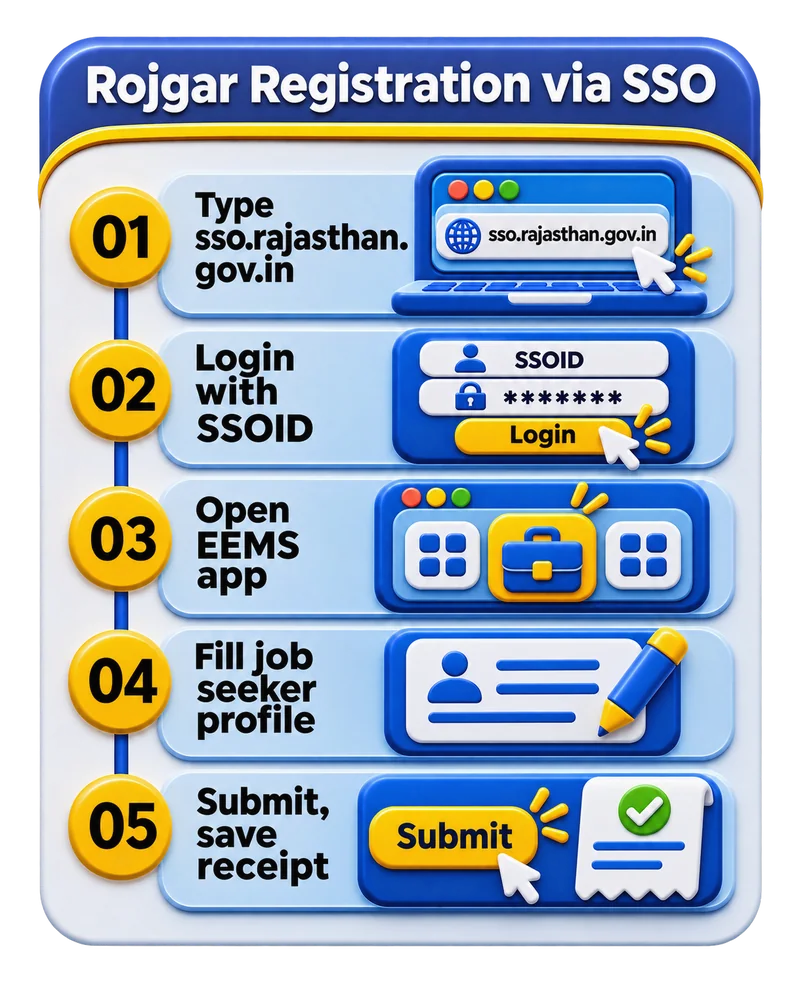
For Rajasthan employment exchange registration, log in at sso.rajasthan.gov.in with your SSOID, open the employment exchange app (EEMS) on your dashboard and fill your job seeker profile with education and contact details. With your documents scanned and ready, the form can usually be finished in one sitting, and you can update it later from the same app.
Dear users, this page explains rojgar registration in Rajasthan through SSO, what EEMS and EEMS 2.0 are, which papers to keep ready, what to know about berojgari bhatta (unemployment allowance), and the official EEMS helpdesk. We are an independent guide, not the government portal. Eligibility, amounts and rules for any allowance are set by the department, so always read the current notice inside the app.
Steps checked on the official portal on 4 November 2026. Independent guide — not the Government of Rajasthan.
What Is EEMS (Employment Exchange Management System)?
EEMS is the online system used by Rajasthan’s employment department for employment exchange services. It is connected to the Rajasthan Single Sign On portal, so you use your SSO ID to reach it.
On the official SSO helpdesk page (checked 4 November 2026), two related entries appear: “Employment Exchange Management System (EEMS)” and “Employment Exchange Management System 2.0 (EEMS 2.0)”. The EEMS entry has the helpdesk number 0141-2368850 and email [email protected]. The EEMS 2.0 entry is listed without a separate phone or email.
In simple terms, registering with the employment exchange puts you on record as a job seeker. Depending on the services the department offers at the time, this record can be used for job information, job fairs and certain state schemes for job seekers, including unemployment allowance schemes.
Your SSO dashboard may show “EEMS”, “EEMS 2.0” or a similar employment tile. Open the one that is active for job seeker registration. If you are unsure which to use, ask the EEMS helpdesk before filling the form twice.
Who Should Register
Registration is meant for people looking for work. Check the conditions shown in the app, because the department decides who is eligible for which service.
Fresh Graduates and Students Finishing Courses
If you have completed your education and are looking for a job, registering early keeps your profile ready for job information and schemes.
Job Seekers Changing Jobs
People who want a new or better job can also keep a job seeker profile, subject to the department’s rules.
Applicants for Allowance Schemes
If you plan to apply for berojgari bhatta or a similar scheme, the department may require an employment exchange registration first. Read the scheme notice.
People Without Online Access
If you are not comfortable with online forms, an authorised e-Mitra kiosk can help you register through your SSO ID. See our e-Mitra login guide.
Documents and Details to Keep Ready
- Working SSO ID: Your own SSOID and password. If you do not have one, use our SSO ID registration guide.
- Jan Aadhaar or Aadhaar details: Many state services use these to fill your personal data. See our Jan Aadhaar SSO guide.
- Mobile number and email: A mobile number you use every day, since OTPs and updates may come to it.
- Education marksheets and certificates: For every qualification you want to add, such as Class 10, Class 12, graduation, diploma or ITI.
- Category or special certificates: Caste, domicile or disability certificates, if they apply to you and the form asks for them.
- Experience details: If you have worked before, the employer names and dates.
- Photo and scans: A recent photograph and clear scans of documents in the format the form asks for.
How to Do Rojgar Registration in Rajasthan Through SSO
These are the general steps for Rajasthan employment exchange registration. The SSO login part was checked on 4 November 2026. Screens inside EEMS belong to the department and may change.
Step 1: Open the Official SSO Portal
Type sso.rajasthan.gov.in yourself in your browser. The page shows “Rajasthan Single Sign On” and an English and हिन्दी toggle at the top. Avoid links from ads or messages.
Step 2: Log In With Your SSOID
Enter “Digital Identity (SSOID/ Username)”, “Password” and the captcha, then click “Login”. Our SSO ID login guide explains this page in detail.
Step 3: Open the Employment Exchange App
On your dashboard, look for the employment exchange tile (EEMS or EEMS 2.0). Click it. It opens with your SSO session, so you do not need a new password.
Step 4: Start a Job Seeker Registration
Select the option for new job seeker registration. Some of your personal details may be filled from your SSO, Jan Aadhaar or Aadhaar data. Check names, date of birth and address carefully.
Step 5: Add Education and Other Details
Enter each qualification with the board or university, year and marks, plus any skills and experience. Upload documents where the form asks.
Step 6: Submit and Save Your Registration Details
Submit the form and save or print the acknowledgement or registration details shown. Keep this safe, because you may need it for schemes, job fairs or renewals.
Berojgari Bhatta (Unemployment Allowance) Through SSO
“Berojgari bhatta sso” is a very common search. Unemployment allowance in Rajasthan is a separate scheme, and the employment exchange registration is often the first step towards it.
We do not list amounts, age limits, income limits or qualification rules here, because the department sets them in the scheme notice and they can change. The general pattern is: you register as a job seeker, then apply for the allowance scheme from within the relevant app on your SSO dashboard when applications are open, and the department verifies your details.
Before you apply, read the full scheme notice inside the app. Check that your name, bank details and Jan Aadhaar or Aadhaar details are correct and match each other, since mismatches are a common reason for delays. If you have questions about eligibility or the status of an allowance application, contact the EEMS helpdesk below.
No one can guarantee you an allowance or a job for a fee. If an agent asks for money to “approve” your bhatta, do not pay. Apply yourself through the official SSO portal or an authorised e-Mitra kiosk.
Common Employment Exchange Problems and Fixes
Many registration problems start with the SSO login. Fix that first, then try EEMS again.
I forgot my SSOID.
Click “I Forgot my Digital Identity (SSOID). Click Here” on the login page, or send “RJ SSO” to 9223166166 from your registered mobile. See our forgot SSO ID guide.
I forgot my password.
Use “I Forgot my Password. Click Here” to reset by mobile or personal email, or send “RJ SSO PASSWORD” to 9223166166 from your registered mobile.
I cannot find the EEMS app on my dashboard.
Look through your citizen apps for EEMS, EEMS 2.0 or an employment tile. If nothing appears, log out, clear your browser cache and log in again.
My details from Jan Aadhaar are wrong.
Correct them in Jan Aadhaar first, through the proper Jan Aadhaar process, and then continue. Wrong base data will carry into your job seeker profile.
I registered twice by mistake.
Do not keep creating new registrations. Contact the EEMS helpdesk with both details and ask how to keep one valid record.
The SMS says my SSO ID was not found.
SMS recovery works only if you have logged in at least once on or after 07/09/2018. Otherwise, contact your district RajSSO helpdesk on our SSO ID helpline number page.
EEMS Helpdesk Number and Email
These contacts are listed on the official SSO helpdesk page (checked 4 November 2026). The SSO helpdesk works on working days from 10 AM to 6 PM.
| App | Phone | |
|---|---|---|
| Employment Exchange Management System (EEMS) | 0141-2368850 | [email protected] |
| Employment Exchange Management System 2.0 (EEMS 2.0) | Not listed | Not listed |
When you call or email, share your SSOID, your registration number if you have one, and a screenshot of the problem. Never share your password or OTP.
हिंदी में जानकारी
राजस्थान में रोज़गार (एम्प्लॉयमेंट एक्सचेंज) पंजीकरण के लिए sso.rajasthan.gov.in पर अपनी SSOID, पासवर्ड और कैप्चा से लॉगिन करें और डैशबोर्ड पर EEMS ऐप खोलें। नया जॉब सीकर पंजीकरण चुनें, अपनी शिक्षा, संपर्क और अन्य जानकारी भरें, दस्तावेज़ अपलोड करें और पावती सुरक्षित रखें। बेरोज़गारी भत्ता एक अलग योजना है; इसकी पात्रता और राशि विभाग तय करता है, इसलिए ऐप में दी गई सूचना ज़रूर पढ़ें। EEMS हेल्पडेस्क: 0141-2368850 और ईमेल [email protected]। भत्ता दिलाने के नाम पर पैसे माँगने वालों से सावधान रहें।
FAQs

Conclusion
Rajasthan employment exchange registration is straightforward once your SSO ID works: sso.rajasthan.gov.in, SSOID and password, captcha, Login, then the EEMS app and a new job seeker registration. Keep your documents scanned, your details matching, and your acknowledgement safe.
For employment exchange help, call 0141-2368850 or email [email protected]. For login trouble, see our SSO ID problems page. Always type the official address yourself and keep your password and OTP private.