
Rajasthan Scholarship 2026: Apply and Track Through Your SSO ID
Most Rajasthan state scholarships are applied for online after you sign in to the SSO portal. This guide shows the general flow, the papers to keep ready and which helpdesk handles which scholarship.
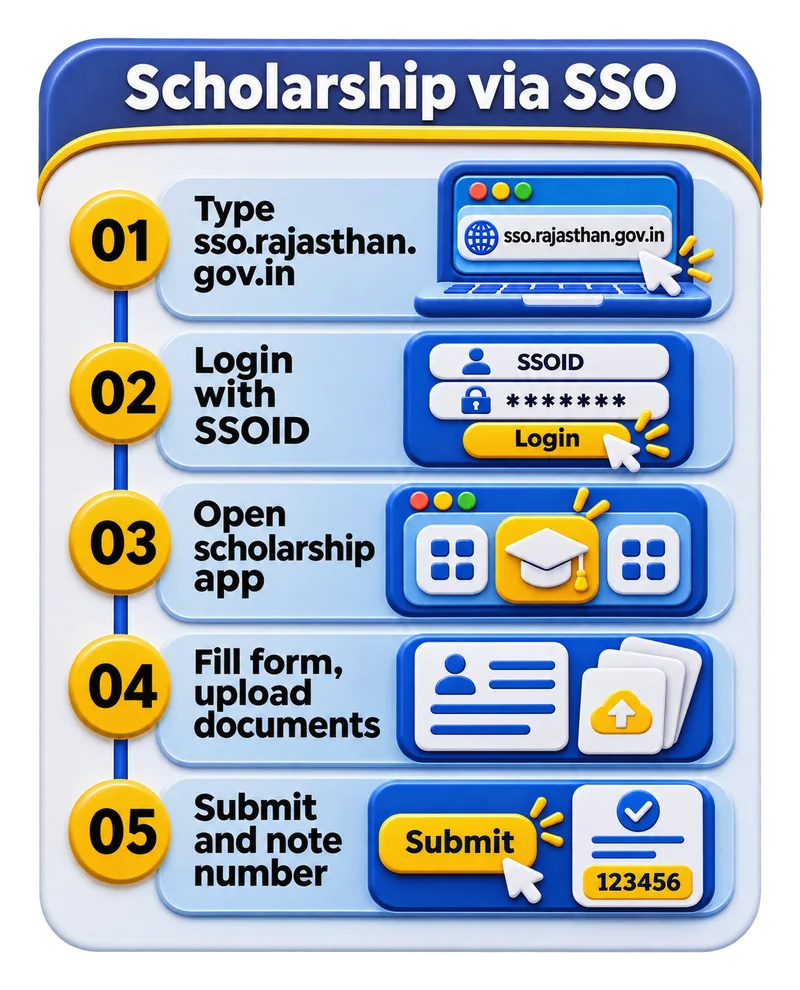
To apply for a Rajasthan scholarship, sign in at sso.rajasthan.gov.in with your SSOID, password and captcha, open the scholarship app on your dashboard, fill the form and upload your documents. If your papers are scanned and ready, you can usually finish the form in one sitting, and you can check the status later from the same app.
Dear users, this page explains the Rajasthan scholarship SSO login in simple steps, which documents students usually keep ready, how to track your application, and which official helpdesk handles which scholarship. We are an independent guide, not the government portal. Scheme rules, amounts and last dates are decided by the departments, so always read the notice inside the scholarship app before you apply.
Steps checked on the official portal on 4 November 2026. Independent guide — not the Government of Rajasthan.
Which Scholarship Apps Are Listed on the SSO Portal
The official SSO helpdesk page (checked 4 November 2026) lists separate scholarship entries, each with its own support contact. Knowing which one your scholarship falls under saves time when you need help.
SCHOLARSHIP (SJE)
Listed under SJE, the Social Justice and Empowerment side. Many students look for this entry when they search for “rajasthan scholarship sso” or “SJE scholarship”. Support: 0141-2226638 and [email protected].
SCHOLARSHIP (CE)
A separate scholarship entry listed as “CE” on the helpdesk page, with its own number 18001806127 and email [email protected].
Swami Vivekananda Scholarship Scheme
Listed on the helpdesk page as “Swami Vivekananda Scholarship Scheme (SVSAES)”. It has its own contact: 01412941493 and [email protected].
Other SJE Apps You May See
The same SJE support number and email also appear for related apps such as SJE MIS and CM Anuprati Coaching (which has its own number, 0141-2922025). These are separate apps, so open only the one that matches your scheme.
The scheme name printed on the notice or advertisement tells you which app to open. If you are not sure whether your scheme is SJE, CE or Swami Vivekananda, ask your college or school scholarship cell before applying, so your form reaches the right department.
What You Need Before You Start
- Working SSO ID: Your own SSOID and password. If you do not have one, create it first with our SSO ID registration guide.
- Jan Aadhaar details: Many state schemes use Jan Aadhaar family data. Make sure your name and details there are correct. See our Jan Aadhaar SSO guide.
- Aadhaar and mobile: An Aadhaar-linked mobile number that is with you, because OTP steps are common.
- Bank account details: An account in the student’s own name, with the IFSC code. Keep the passbook first page handy.
- Marksheets: The previous qualifying exam marksheet and any other marksheets the form asks for.
- Admission or fee proof: Current year admission details or fee receipt from your institution, if asked.
- Category and income papers: Caste certificate, income certificate or domicile certificate, where your scheme requires them.
- Scanned copies and photo: Clear scans in the file type and size the form asks for, plus a recent photograph.
Do not upload blurry phone photos of documents. Most rejections and objections come from unreadable uploads or a name that is spelled differently on two documents. Fix spelling mismatches first.
How to Apply for a Rajasthan Scholarship Through SSO
These are the general steps for a scholarship SSO login and application. The SSO login part was checked on 4 November 2026. Screens inside each scholarship app are run by the department and may differ.
Step 1: Open the Official SSO Portal
Type sso.rajasthan.gov.in yourself in your browser. The page shows “Rajasthan Single Sign On” with an English and हिन्दी toggle at the top. Do not open the portal from ads or forwarded links.
Step 2: Log In With Your SSOID
Enter “Digital Identity (SSOID/ Username)”, “Password” and the captcha, then click “Login”. Students must use their own SSO ID, not a parent’s or a cyber cafe’s. Our SSO ID login guide covers this screen.
Step 3: Open the Scholarship App
On your dashboard, look for the scholarship app that matches your scheme. Several apps have similar names, so read the tile names carefully and open the one for your scheme.
Step 4: Complete Your Profile
Most scholarship apps ask you to fill or confirm a student profile first: personal details, Jan Aadhaar or Aadhaar details, bank account, address and education details. Check every field before saving.
Step 5: Choose the Scheme and Fill the Form
Select the scholarship scheme that applies to you, enter your current course and institution, and fill the remaining fields. Read any eligibility note shown on screen before continuing.
Step 6: Upload Documents and Submit
Upload each document in the right slot, preview it, and submit. Note down or screenshot the application number shown at the end. Your application usually then moves to your institution and the department for verification.
Swami Vivekananda Scholarship
“Swami vivekananda scholarship” is one of the most searched scholarship terms in Rajasthan. On the SSO helpdesk page it is listed as “Swami Vivekananda Scholarship Scheme (SVSAES)”.
This scheme has its own helpdesk entry, separate from the SJE and CE scholarship entries. The listed contact is 01412941493, with email [email protected]. If your question is about this scheme, use this contact rather than the general scholarship numbers, because they are handled by different teams.
We do not list eligibility rules, the number of awards or amounts for this scheme here, because they are set in the official scheme notice and can change from year to year. Read the current notice inside the app on the SSO portal, or ask your institution’s scholarship cell, before you apply.
How to Check Your Scholarship Status
- Step 1: Log in at sso.rajasthan.gov.in with your SSOID, password and captcha.
- Step 2: Open the same scholarship app you used to apply.
- Step 3: Look for your submitted application or the status option shown in the app.
- Step 4: Read the current stage, such as pending with your institution, pending with the department, objection raised, or approved.
- Step 5: If there is an objection, open it, read the reason, correct the detail or document and resubmit within the time shown.
Status is usually tracked inside the same scholarship app where you applied:
An objection is not a rejection. It usually means a document or detail needs correcting. Check your status every few days during the scholarship season so you do not miss a correction window.
Common Scholarship SSO Problems and Fixes
Many scholarship problems are really SSO login problems. Fix the SSO side first, then go back to the scholarship app.
I forgot my SSOID.
Click “I Forgot my Digital Identity (SSOID). Click Here” on the login page, or send “RJ SSO” to 9223166166 from your registered mobile. Full steps are on our forgot SSO ID page.
I forgot my password.
Use “I Forgot my Password. Click Here” to reset by mobile or personal email, or send “RJ SSO PASSWORD” to 9223166166 from your registered mobile.
The scholarship app is not on my dashboard.
Look carefully through the citizen apps on your dashboard, since names are similar. If it still does not appear, log out, clear your browser cache and log in again. Make sure you are logged in with the student’s own SSO ID.
My bank account details were rejected.
Check that the account is in the student’s name, the IFSC code is correct and the account is active. Correct the details through the objection or profile option in the app if it allows editing.
My institution has not verified my form.
Contact your college or school scholarship cell first, since institution-level verification is done by them. If the delay continues, contact the helpdesk for your scheme.
The SMS says my SSO ID was not found.
SMS recovery works only if you have logged in at least once on or after 07/09/2018. Otherwise, contact your district RajSSO helpdesk listed on our SSO ID helpline number page.
Rajasthan Scholarship Helpline Numbers
These contacts are listed on the official SSO helpdesk page (checked 4 November 2026). The SSO helpdesk works on working days from 10 AM to 6 PM.
| Scholarship listed on SSO | Phone | |
|---|---|---|
| SCHOLARSHIP (SJE) | 0141-2226638 | [email protected] |
| SCHOLARSHIP (CE) | 18001806127 | [email protected] |
| Swami Vivekananda Scholarship Scheme (SVSAES) | 01412941493 | [email protected] |
| CM Anuprati Coaching | 0141-2922025 | [email protected] |
When you call or email, share your SSOID, the scheme name, your application number and a screenshot of the error. Never share your password or OTP with anyone, including people who say they are from a helpdesk.
हिंदी में जानकारी
राजस्थान की ज़्यादातर राज्य छात्रवृत्तियों के लिए sso.rajasthan.gov.in पर अपनी SSOID, पासवर्ड और कैप्चा से लॉगिन करें और डैशबोर्ड पर स्कॉलरशिप ऐप खोलें। प्रोफ़ाइल भरें, योजना चुनें, दस्तावेज़ अपलोड करें और आवेदन संख्या नोट कर लें। जन आधार, बैंक खाता, अंकतालिका और ज़रूरी प्रमाण पत्र पहले से स्कैन करके रखें। स्टेटस उसी ऐप में देखें और आपत्ति आने पर समय पर सुधार करें। हेल्पडेस्क: SCHOLARSHIP (SJE) 0141-2226638, SCHOLARSHIP (CE) 18001806127 और स्वामी विवेकानंद स्कॉलरशिप योजना 01412941493।
FAQs

Conclusion
Applying for a Rajasthan scholarship is simple once your SSO ID works: sso.rajasthan.gov.in, SSOID and password, captcha, Login, then the right scholarship app. Keep your documents scanned and your bank details correct, and check your status regularly for objections.
For help, use the helpdesk for your scheme: 0141-2226638 for SJE, 18001806127 for CE, or 01412941493 for the Swami Vivekananda Scholarship Scheme. For login trouble, see our SSO ID problems page. Always type the official address yourself and keep your password and OTP private.