
Jan Aadhaar SSO 2026: Link, Download and e-KYC Made Simple
Rajasthan residents can create an SSO ID using their Jan Aadhaar and then open Jan Aadhaar services from the SSO dashboard. Here is how it works, and what to do when details do not match.
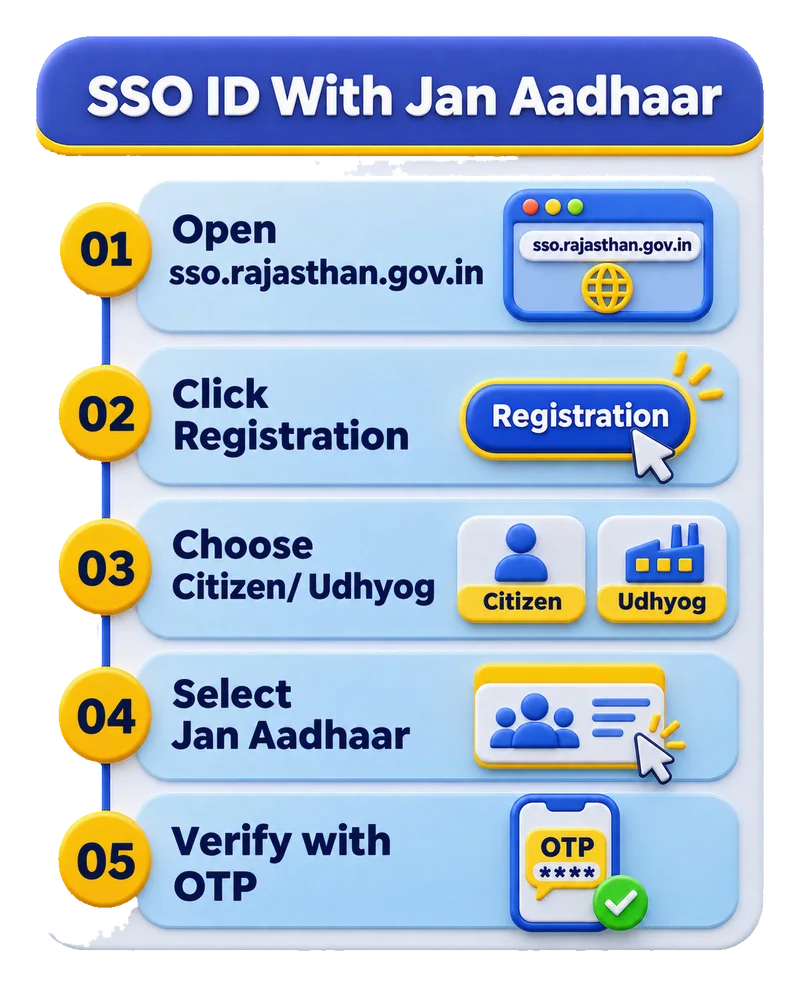
To use Jan Aadhaar with SSO, register on sso.rajasthan.gov.in under “Citizen/ Udhyog” and choose the “Jan Aadhaar” option, which is only for residents of Rajasthan. After you log in, you can open Jan Aadhaar services from your SSO dashboard, and the whole registration usually takes a few minutes if your mobile number is up to date.
Dear users, this guide covers the SSO ID and Jan Aadhaar link, how to use Jan Aadhaar services after login, how card download and e-KYC generally work, the most common mismatch problems and the official Jan Aadhaar helpdesk. We are an independent guide, not the government portal. Always type the official address yourself and never share your OTP or password.
Steps checked on the official portal on 4 November 2026. Independent guide — not the Government of Rajasthan.
What Is Jan Aadhaar and Why Link It to SSO?
Jan Aadhaar is the Government of Rajasthan’s family identity. One Jan Aadhaar record holds the details of the head of the family and the family members, and many state schemes and services use it.
Your SSO ID is your personal digital login for Rajasthan government apps. When you create your SSO ID with Jan Aadhaar, the portal can use your family record to fill your basic details, and state apps can recognise you as a Rajasthan resident.
This link matters in daily life. Scheme applications, e-Mitra services and even recruitment use it. The official Rajasthan Recruitment Portal, for example, describes “Integration with Aadhaar, Jan-Aadhar and Employee ID” as one of its features.
How to Register an SSO ID With Jan Aadhaar
These steps follow the SSO registration page as checked on 4 November 2026. The portal shows the available options at each step, so read each screen before you click.
Step 1: Open the Official SSO Portal
Type sso.rajasthan.gov.in yourself in your browser. You can switch between English and हिन्दी using the toggle at the top.
Step 2: Click Registration
On the sign-in page, click Registration. The registration page has two tabs: “Citizen/ Udhyog” and “Govt. Employee”.
Step 3: Choose Citizen/ Udhyog
Select the “Citizen/ Udhyog” tab. Government employees should use the “Govt. Employee” tab instead, which uses employee details. See our employee login guide if that is you.
Step 4: Select the Jan Aadhaar Option
Under Citizen/ Udhyog, the portal offers “Jan Aadhaar” (Only for Residents of Rajasthan State, India) and “Google” (All Others, including above). Choose Jan Aadhaar if you are a Rajasthan resident with a Jan Aadhaar record.
Step 5: Enter Your Jan Aadhaar Details and Verify
Enter your Jan Aadhaar number and pick your name from the family members the portal shows, if asked. Complete the verification the portal asks for, which is usually an OTP sent to the mobile number registered in your record.
Step 6: Set Your SSOID and Password
Choose your username (SSOID) and a strong password that follows the portal’s password policy. Save your SSOID somewhere safe. You can now log in on the Login page.
If you are not a Rajasthan resident or do not have Jan Aadhaar, you can register with the “Google” option instead. You can also read our full SSO ID registration guide.
Using Jan Aadhaar Services After SSO Login
- Step 1: Open sso.rajasthan.gov.in and log in with your SSOID, password and captcha.
- Step 2: On your dashboard, find the Jan Aadhaar app among your citizen apps and click it.
- Step 3: The Jan Aadhaar app opens with your SSO session. Choose the service you need from the options shown.
- Step 4: Complete any OTP or authentication the app asks for.
- Step 5: Note the request or acknowledgement number for tracking.
Once your SSO ID is active, you can open Jan Aadhaar from your dashboard. The exact menu inside the Jan Aadhaar app may change, so follow what the screen shows.
If you cannot do it yourself, an authorised e-Mitra kiosk can help with Jan Aadhaar services. See our e-Mitra login guide.
Jan Aadhaar Download and e-KYC: What to Know
Many people search for “jan aadhaar download” and “jan aadhaar e kyc”. Here is what you can safely rely on.
We were not able to open the official Jan Aadhaar portal (janaadhaar.rajasthan.gov.in) on 4 November 2026 to confirm the current download screens, so we are not listing menu names that may be outdated. In general, the official Jan Aadhaar portal and the Jan Aadhaar app on your SSO dashboard show the card download option to the family whose record it is, after identity verification, usually by OTP to the registered mobile.
e-KYC is the process of confirming a person’s identity details electronically against official records. If a member’s e-KYC is incomplete, some services may not work for that member until it is done. The Jan Aadhaar portal or app shows the e-KYC status and the steps available. If you are stuck, an e-Mitra kiosk can usually help, or you can call the Jan Aadhaar helpdesk below.
Download your Jan Aadhaar only from the official portal, the official app inside SSO, or an authorised e-Mitra kiosk. Avoid websites that ask you to pay for a “Jan Aadhaar PDF” or ask for your OTP.
Common Jan Aadhaar SSO Problems and Fixes
Most Jan Aadhaar SSO problems come from details that do not match between records, or a mobile number that has changed.
OTP is not coming during SSO registration.
The OTP goes to the mobile number in your Jan Aadhaar record. If that number is old, update it in your Jan Aadhaar record first (through the Jan Aadhaar portal or an e-Mitra kiosk), then try again.
My name or date of birth does not match.
Details are taken from your records, so the fix is in the source record, not in SSO. Correct the details in your Jan Aadhaar record first, then retry. Contact the Jan Aadhaar helpdesk if you are unsure which record is wrong.
The portal says an SSO ID already exists.
You may have registered earlier. Use “I Forgot my Digital Identity (SSOID). Click Here” or send “RJ SSO” to 9223166166 from your registered mobile. See forgot SSO ID.
I now have two SSO IDs.
This often happens when someone registers once with Google and once with Jan Aadhaar. Keep one main ID and read our merge SSO ID guide.
The Jan Aadhaar app is not on my dashboard.
Log out, clear your browser cache and log in again. If you registered with Google, some Jan Aadhaar based services may ask you to verify your Jan Aadhaar details first.
A scheme payment is not reaching my account.
Direct benefit transfers that use Jan Aadhaar are handled by the Jan Aadhaar DBT engine team. Use the DBT contact in the table below with your Jan Aadhaar number and scheme name.
Jan Aadhaar Helpdesk Number and Email
These contacts are listed on the official SSO helpdesk page (checked 4 November 2026). The SSO helpdesk works on working days from 10 AM to 6 PM.
| App | Phone | |
|---|---|---|
| Jan Aadhaar | 0141-2850287 | [email protected] |
| JAN AADHAAR DBT ENGINE | 0141-2850287, 0141-2923377 | [email protected] |
Share your Jan Aadhaar number, SSOID and a screenshot of the error when you contact them. Never share your OTP or password. For SSO login issues, see our SSO ID helpline number page.
Quick Checklist Before You Start
- Rajasthan resident: The Jan Aadhaar option is only for residents of Rajasthan.
- Jan Aadhaar number ready: Keep your family’s Jan Aadhaar number with you.
- Working mobile: The mobile in your record should be with you to receive the OTP.
- Correct details: Check your name and date of birth in your records before registering.
- One SSO ID: Do not create a second ID if you already have one. Recover the old one instead.
- Official address only: Type sso.rajasthan.gov.in yourself.
हिंदी में जानकारी
जन आधार से SSO ID बनाने के लिए sso.rajasthan.gov.in खोलें, Registration पर क्लिक करें और “Citizen/ Udhyog” टैब में “Jan Aadhaar” विकल्प चुनें। यह विकल्प केवल राजस्थान के निवासियों के लिए है। जन आधार में दर्ज मोबाइल पर आए OTP से सत्यापन करें और अपनी SSOID व पासवर्ड बनाएं। लॉगिन के बाद डैशबोर्ड पर Jan Aadhaar ऐप से सेवाएँ खोल सकते हैं। नाम या जन्मतिथि मेल न खाए तो पहले मूल रिकॉर्ड में सुधार कराएं। जन आधार हेल्पडेस्क: 0141-2850287, ईमेल [email protected]।
FAQs

Conclusion
Linking Jan Aadhaar with SSO is the simplest path for Rajasthan residents: register under “Citizen/ Udhyog”, choose “Jan Aadhaar”, verify with the OTP and set your SSOID. After that, Jan Aadhaar services open from your SSO dashboard.
When something does not match, fix the source record first. For help, call the Jan Aadhaar helpdesk on 0141-2850287, and for general SSO login help contact your district RajSSO helpdesk. Type the official address yourself and keep your OTP private.