
SIPF Portal 2026: SIPF Login Guide for Rajasthan Employees
SIPF is Rajasthan’s State Insurance & Provident Fund department, which handles provident fund and insurance matters for state employees. Employees usually reach SIPF services by signing in to the SSO portal with their Govt. Employee SSO ID.
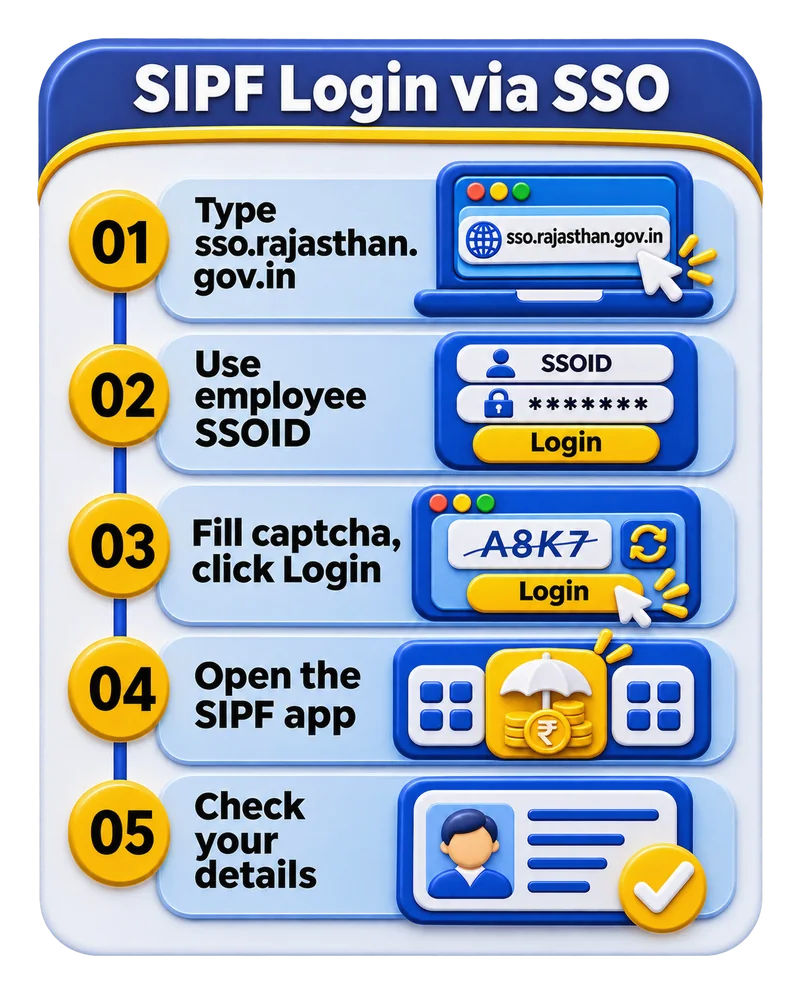
For SIPF login, Rajasthan government employees open sso.rajasthan.gov.in, sign in with their Govt. Employee SSOID, password and captcha, and click the SIPF app shown on their dashboard. It usually takes a minute or two, and you use your normal SSO password rather than a separate SIPF password.
Dear users, SIPF also matters before you ever log in: the “Govt. Employee” registration on the SSO portal uses your SIPF/employee details. This guide explains what SIPF is in simple words, how it connects with your SSO ID, the common problems and which official SIPF-related contacts are listed on the SSO helpdesk. We are an independent guide, not the government portal, so always type the official address yourself and never share your password or OTP.
Steps checked on the official portal on 4 November 2026. Independent guide — not the Government of Rajasthan.
What Is SIPF Rajasthan?
SIPF stands for State Insurance & Provident Fund. It is the Rajasthan government department that deals with insurance and provident fund matters of state government employees.
For most employees, SIPF is linked with things like their General Provident Fund (GPF) account and state insurance cover. Over a career, deductions for these appear on the salary slip, and SIPF records keep track of them. Details such as contribution rates, loan or withdrawal rules and claim procedures are set by government rules and can change, so always confirm them from official SIPF notices or your office.
The SSO portal’s helpdesk list shows an app called “State Insurance & Provident Fund (NEW)”. Other SSO apps also use SIPF email addresses for support, including the Rajasthan Government Health Scheme (RGHS) and the Mukhymantri Vishwakarma Pension Yojana. We could not open the official SIPF website on 4 November 2026, so we keep this page general and do not list internal menu names.
How SIPF Connects to Your SSO ID
SIPF plays two roles for an employee on the SSO portal: it helps identify you during registration, and it offers its own services after login.
Govt. Employee registration
The SSO registration page at sso.rajasthan.gov.in/register has a “Govt. Employee” tab. Employees register there using their SIPF/employee details, which links the new SSO ID to their service record.
Why this matters
Because your employee SSO ID is tied to these details, employee apps such as SIPF, RGHS and IFMS can recognise you. A citizen SSO ID made with Jan Aadhaar or Google is not linked in the same way.
Keep your details ready
Before registering, keep your employee details handy and make sure your office records (name, date of birth, mobile number) are correct. Mismatches are a common cause of failed registration.
Already registered as a citizen?
If you made a citizen ID earlier for exams or e-Mitra, do not keep creating new IDs. Ask your office which ID your employee apps should use, and see our merge SSO ID guide.
Full employee guide
For the complete employee registration and login route, read our SSO ID employee login guide.
How to Do SIPF Login Through SSO
SIPF login uses the standard SSO flow. Steps checked on 4 November 2026 on the SSO portal. The options inside the SIPF app depend on your role and may change.
Step 1: Open the Official SSO Portal
Type sso.rajasthan.gov.in yourself in Chrome or another updated browser. The page shows “Rajasthan Single Sign On” and “One Digital Identity for all Applications”. Do not use SIPF login links from WhatsApp or unknown websites.
Step 2: Enter Your Employee SSOID and Password
Fill “Digital Identity (SSOID/ Username)” with your Govt. Employee SSOID and enter your “Password”. Using a citizen SSOID usually means SIPF will not appear.
Step 3: Fill the Captcha and Click Login
Type the characters in “Enter Captcha”. Use the refresh or audio icon if the image is unclear, then click “Login”.
Step 4: Open the SIPF App
On your SSO dashboard, look for the SIPF or State Insurance & Provident Fund app tile. If you have many apps, scroll carefully or use any search box the dashboard shows.
Step 5: Check Your Details
Inside the app, review the information shown for your account, such as your personal details and the provident fund or insurance information available to you. Report any mistakes through your office.
Step 6: Log Out When Finished
Log out of the SIPF app and the SSO portal, especially on shared computers. Your financial details are private.
SIPF records are built from what your office submits. If your GPF or insurance details look wrong, start with your DDO or accounts section, then contact SIPF if needed.
SIPF Rajasthan Services at a Glance
Here is a simple view of the areas employees commonly link with SIPF. Exact services and steps are decided by the department.
- Provident fund (GPF): Employees track their provident fund through SIPF records. Deductions appear on the salary slip, explained in our Paymanager login guide.
- State insurance: SIPF handles the state’s insurance matters for employees, as its name suggests.
- Health scheme support: The RGHS helpdesk email on the SSO portal is an SIPF address. See our RGHS login guide.
- Pension scheme support: The Mukhymantri Vishwakarma Pension Yojana is listed on the SSO helpdesk with an SIPF email address.
- Employee identity for SSO: Govt. Employee registration on the SSO portal uses SIPF/employee details.
Common SIPF Login Problems and Fixes
Most SIPF login problems come from the SSO ID itself, the wrong account type or a record mismatch.
The SIPF app is not showing on my SSO dashboard.
You may be logged in with a citizen SSOID. Log in with your Govt. Employee SSOID. If it still does not appear, ask your office to check your record, or email [email protected] with your SSOID and department.
Govt. Employee registration fails with my employee details.
The details you type must match your official record exactly. Check your name, date of birth and mobile number with your office, and ask them to correct any mismatch before trying again.
I forgot my SSOID.
Use “I Forgot my Digital Identity (SSOID). Click Here” and choose Govt. Employee, or send “RJ SSO” to 9223166166 from your registered mobile. See our forgot SSO ID page.
I forgot my SSO password.
Use “I Forgot my Password. Click Here” and reset by mobile or personal email, or send “RJ SSO PASSWORD” to 9223166166 from your registered mobile. See the SSO password reset guide.
The SMS method says no record found.
The forgot options work only if you logged in to SSO at least once on or after 07/09/2018. Otherwise contact your district RajSSO helpdesk.
My GPF or insurance details look wrong.
These records come from what your office submits. Ask your DDO to check first, then contact SIPF with your employee details and a screenshot.
The SIPF page is slow or blank.
Clear your browser cache, close other tabs and log in again from the SSO portal. Try at a quieter time if it continues.
SIPF Helpdesk: Official Contacts on the SSO Portal
The SSO helpdesk page does not show one single SIPF phone number. Instead, it lists these SIPF-related entries, each for a specific app. Use the contact for the service you need. Checked on the SSO helpdesk page on 4 November 2026; the SSO helpdesk works on working days from 10 AM to 6 PM.
| Listed for this app | Phone | |
|---|---|---|
| State Insurance & Provident Fund (NEW) | Not listed | [email protected] |
| Rajasthan Government Health Scheme (RGHS) | 0141-2740252 | [email protected] |
| Mukhymantri Vishwakarma Pension Yojana | 0141-2740219 | [email protected] |
For general SIPF app issues, use [email protected]. The phone numbers above are listed only for RGHS and the Vishwakarma Pension Yojana, so use them for those services. Never share your password or OTP. For SSO account problems, see our SSO ID helpline number page.
हिंदी में जानकारी
SIPF यानी स्टेट इंश्योरेंस एंड प्रोविडेंट फंड विभाग राजस्थान के सरकारी कर्मचारियों के बीमा और प्रोविडेंट फंड से जुड़े काम देखता है। SSO पोर्टल पर “Govt. Employee” टैब से रजिस्ट्रेशन में कर्मचारी अपने SIPF/कर्मचारी विवरण का उपयोग करते हैं। SIPF लॉगिन के लिए sso.rajasthan.gov.in खोलें, अपनी कर्मचारी SSOID, पासवर्ड और कैप्चा भरकर Login करें और डैशबोर्ड पर SIPF ऐप पर क्लिक करें। ऐप न दिखे तो कार्यालय से संपर्क करें या [email protected] पर ईमेल करें। RGHS के लिए 0141-2740252 नंबर दिया गया है। अपना पासवर्ड या OTP किसी को न बताएं।
FAQs

Conclusion
SIPF is the State Insurance & Provident Fund department, and for Rajasthan employees it is both the source of the details used in Govt. Employee SSO registration and a service you open after login. The route is simple: sso.rajasthan.gov.in, your employee SSOID and password, captcha, Login, then the SIPF app.
If the app is missing or your details look wrong, check with your office first, then email [email protected]. For health scheme or Vishwakarma pension questions, use the numbers listed for those services. Stay safe, type the official address yourself, and never share your password or OTP.