IFMS Rajasthan 2026: IFMS Login and IFMS 3.0 Guide
IFMS is Rajasthan’s Integrated Financial Management System, used by government offices and employees for finance work. Most users reach it by signing in to the SSO portal and opening the IFMS app on their dashboard.
For IFMS Rajasthan login, type sso.rajasthan.gov.in, sign in with your SSOID, password and captcha, and click the IFMS (or IFMS 3.0) app on your SSO dashboard. It normally takes a minute, and you use your SSO password; the apps you see depend on the role your office has given you.
Dear users, this guide explains what IFMS is in simple words, the different IFMS entries you may see (IFMS, IFMS 3.0, IFMSR and IFMS-LTA), the usual login problems and the official IFMS helpdesk numbers. We are an independent guide, not the government portal. Always type the official address yourself and never share your password or OTP with anyone.
Steps checked on the official portal on 4 November 2026. Independent guide — not the Government of Rajasthan.
What Is IFMS Rajasthan?
IFMS stands for Integrated Financial Management System. It is the Government of Rajasthan’s online system for handling government finance work in one place, and it is reached through the SSO portal.
In simple terms, government money moves through budgets, bills, treasuries and payments. IFMS brings this work online so that offices, treasuries and the Finance Department can work on the same system instead of paper registers. Employees mostly meet IFMS when they deal with salary-related services, while office staff use it for bills and accounts.
IFMS is one of the many G2G (government-to-government) apps on the Rajasthan Single Sign On portal, which listed 431 G2G apps on its sign-in page on 4 November 2026. We could not open the official IFMS website on that date, so we keep module details general and do not list internal menu names.
IFMS, IFMS 3.0, IFMSR and IFMS-LTA
The SSO helpdesk page shows four separate IFMS-related entries. Here is what we can say about each from the official list. The helpdesk page itself does not explain the full scope of each one.
IFMS
The main entry, listed with phone 0141-2924501 and email [email protected]. This is the general IFMS app many users open from their dashboard.
IFMS 3.0
Listed with the same phone and email as IFMS. People search for “ifms 3.0” because it is the newer version name shown on the SSO portal. You still open it from your SSO dashboard.
IFMSR
Listed separately with phone 0141-2740637, 5111007, 5111010 and email [email protected]. Its support team is different from the main IFMS team.
IFMS-LTA
Also listed with phone 0141-2740637, 5111007, 5111010 but with a different email, [email protected]. Use this contact only for issues in the IFMS-LTA app.
Which one should I open?
Open the app your office has assigned to you. If your dashboard shows more than one, ask your DDO or accounts section which one to use for your task.
Related finance apps
The SSO helpdesk list also shows a separate “Finance” entry and “Commitment Control System (CCS) Finance”. For salary slips, see our Paymanager login guide.
Who Uses IFMS?
IFMS is a work system for people inside government, not a citizen service.
Drawing and Disbursing Officers (DDOs), office accountants and billing clerks use IFMS for bills, payments and accounts of their office. Treasury and Finance Department staff use it to check and process this work at their level.
State government employees use IFMS-linked services mainly for their own salary and service-related details. They usually log in with the SSOID created under the Govt. Employee tab. If you do not have one yet, our SSO ID employee login guide explains the Govt. Employee registration route.
Citizens do not need IFMS. For bill payments and certificates, see our e-Mitra login guide.
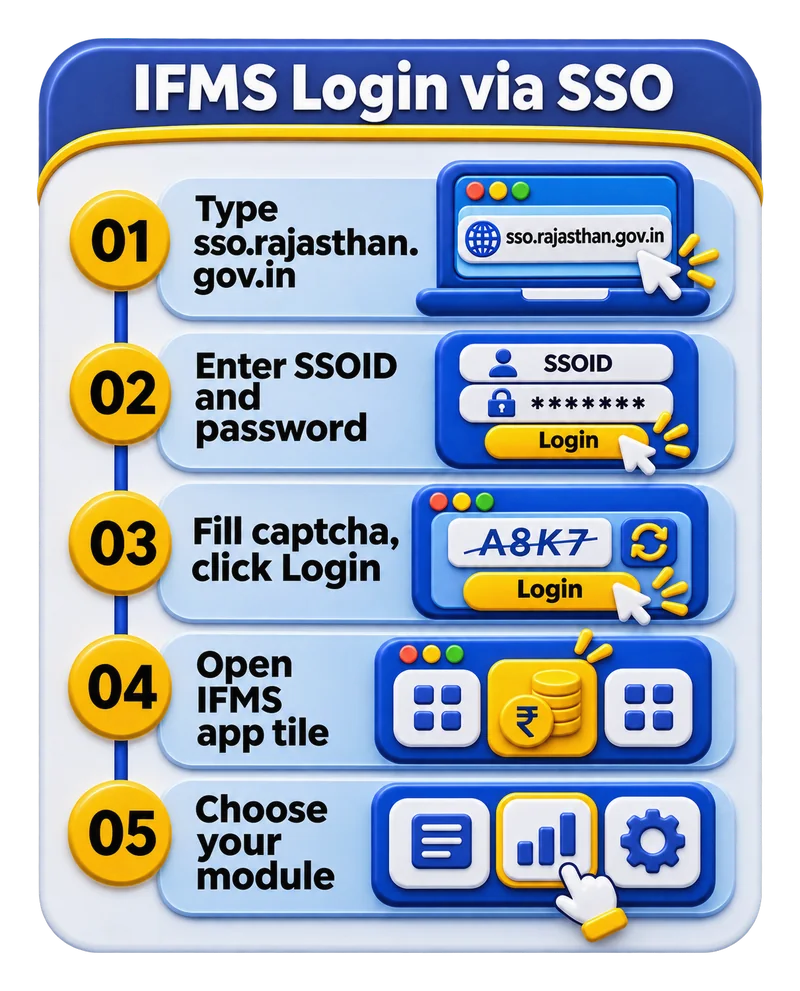
How to Do IFMS Login Through SSO
IFMS login follows the standard SSO flow. Steps checked on 4 November 2026 on the SSO portal. What you see inside IFMS depends on your role.
Step 1: Open the Official SSO Portal
Type sso.rajasthan.gov.in yourself in Chrome, Edge or Firefox. The page shows “Rajasthan Single Sign On” and “One Digital Identity for all Applications”. Avoid “IFMS login” links from WhatsApp groups or unknown websites.
Step 2: Enter Your SSOID and Password
Fill “Digital Identity (SSOID/ Username)” with your employee SSOID and type your “Password”. Use the ID your department has linked to IFMS.
Step 3: Fill the Captcha and Click Login
Type the characters shown in “Enter Captcha”. Use the refresh or audio icon if needed, then click “Login”.
Step 4: Open the IFMS App
On your dashboard, look for the IFMS or IFMS 3.0 tile. If you have many apps, scroll through them or use any search box the dashboard shows.
Step 5: Choose Your Module or Task
IFMS opens with your SSO session. Choose the module or option your role allows. Office users will see different options from employees who only view their own details.
Step 6: Log Out When Finished
Log out of IFMS and then from the SSO portal, especially on shared office computers. Finance actions are recorded against your ID.
The SSO login page also has a “Meri Pehchaan” button (national single sign-on, powered by e-Pramaan). Most Rajasthan employees use their SSOID and password. Use Meri Pehchaan only if your office has told you to.
Common IFMS Login Problems and Fixes
Most “IFMS not working” complaints come from the SSO login, missing app access or browser issues.
IFMS is not showing on my SSO dashboard.
You may be using a citizen SSOID, or IFMS has not been mapped to your ID yet. Log in with your Govt. Employee SSOID. If it is still missing, ask your DDO or office nodal officer to request access.
I forgot my SSOID.
Use “I Forgot my Digital Identity (SSOID). Click Here” and choose Govt. Employee, or send “RJ SSO” to 9223166166 from your registered mobile. See our forgot SSO ID page.
I forgot my SSO password.
Use “I Forgot my Password. Click Here” and reset by mobile or personal email, or send “RJ SSO PASSWORD” to 9223166166 from your registered mobile. Steps are in our SSO password reset guide.
The SMS method does not find my ID.
The forgot options work only if you logged in to SSO at least once on or after 07/09/2018. If not, contact your district RajSSO helpdesk.
IFMS opens but a module shows an error.
Clear your browser cache, close other tabs and log in again from the SSO portal. If the error stays, note the module name, the exact message and the time, and contact the IFMS helpdesk.
IFMS is very slow at the start of the month.
Salary and bill work peaks around month start, so the system can be busy. Try at a quieter time and avoid repeated clicks that may submit a form twice.
I have two SSO IDs.
IFMS is linked to the ID your department uses. Log in with that one, and see our merge SSO ID guide if your records are split.
IFMS Helpdesk Number and Email
These are the IFMS-related entries on the SSO portal’s helpdesk page, checked on 4 November 2026. The SSO helpdesk works on working days from 10 AM to 6 PM.
| App | Phone | |
|---|---|---|
| IFMS | 0141-2924501 | [email protected] |
| IFMS 3.0 | 0141-2924501 | [email protected] |
| IFMSR | 0141-2740637, 5111007, 5111010 | [email protected] |
| IFMS-LTA | 0141-2740637, 5111007, 5111010 | [email protected] |
| Finance | 0141-2924462 | [email protected] |
Contact the team for the exact app you are using. Give your SSOID, office, DDO code if you have one, the module name and a screenshot. Never share your password or OTP. For SSO account issues, see our SSO ID helpline number page.
Tips for Safe IFMS Use
- Use the right SSOID: IFMS is linked to the employee ID your department uses.
- Keep your mobile updated: Password resets go to your registered mobile number.
- Use an updated browser: Recent Chrome, Edge or Firefox versions work best.
- Never share your login: Every bill and approval is recorded against your SSOID.
- Start from the real address: Bookmark sso.rajasthan.gov.in and open IFMS from there.
- Log out after work: Especially on office or cyber cafe computers.
हिंदी में जानकारी
IFMS यानी इंटीग्रेटेड फाइनेंशियल मैनेजमेंट सिस्टम राजस्थान सरकार की वित्तीय कामकाज की ऑनलाइन प्रणाली है, जिसका उपयोग कार्यालय, DDO और कर्मचारी करते हैं। IFMS लॉगिन के लिए sso.rajasthan.gov.in खोलें, अपनी कर्मचारी SSOID, पासवर्ड और कैप्चा भरकर Login करें और डैशबोर्ड पर IFMS या IFMS 3.0 ऐप पर क्लिक करें। अगर ऐप न दिखे तो अपने DDO या नोडल अधिकारी से संपर्क करें। IFMS हेल्पडेस्क: 0141-2924501, ईमेल [email protected]। IFMSR और IFMS-LTA के लिए 0141-2740637, 5111007, 5111010 नंबर दिए गए हैं। अपना पासवर्ड या OTP किसी को न बताएं।
FAQs
Conclusion
IFMS Rajasthan login is simple once you know the route: sso.rajasthan.gov.in, your employee SSOID and password, captcha, Login, then the IFMS or IFMS 3.0 app. What you see inside depends on the role your office has given you.
Most problems come from missing app access, a forgotten password or using the wrong SSOID. For system issues, contact IFMS on 0141-2924501 or [email protected], and use the separate IFMSR and IFMS-LTA contacts for those apps. Stay safe, type the official address yourself, and never share your password or OTP.