
SSO ID Employee Login 2026: Guide for Rajasthan Government Employees
Rajasthan government employees register on a separate “Govt. Employee” tab and then use one SSO ID for RajKaj, IFMS, RGHS and other office apps. Here is how to register, log in and fix the usual employee ID problems.
For SSO ID employee login, type sso.rajasthan.gov.in yourself, enter your “Digital Identity (SSOID/ Username)”, password and Captcha, and click “Login”; your department apps then open from the dashboard. If you do not have an employee SSO ID yet, create one first on the separate “Govt. Employee” tab of the registration page, which takes a few minutes once your employee details are ready.
Dear users, this is an independent guide, not the government portal. We never ask for your password or OTP. The steps below were checked on 4 November 2026.
Steps checked on the official portal on 4 November 2026. Independent guide — not the Government of Rajasthan.
Who Needs an Employee SSO ID?
If you are a Rajasthan state government employee, your office work, salary-related services and health scheme mostly run through apps behind the SSO portal.
The Rajasthan Single Sign On portal, run by the Department of Information Technology & Communication (DoIT&C), lists 431 G2G (government-to-government) apps on its sign-in page as of 4 November 2026. These are the internal apps that employees, offices and departments use, separate from the 272 citizen and business (G2C/G2B) apps.
To reach most of these G2G apps, the portal needs to know you are a government employee. That is why registration has a separate “Govt. Employee” tab instead of the usual citizen route. If you want the basics first, read what an SSO ID is.
Govt Employee SSO Registration: The Separate Tab
The registration page at sso.rajasthan.gov.in/register has two tabs: “Citizen/ Udhyog” and “Govt. Employee”. Picking the right one at the start saves trouble later.
Govt. Employee tab
This tab is for state government employees. Registration here uses your employee details from the state’s employee records (SIPF/employee ID), so the new SSO ID is linked to your service record.
Citizen/ Udhyog tab
This is for residents, students, job seekers and businesses, using Jan Aadhaar (Rajasthan residents only) or Google (everyone). See our SSO ID registration guide for that route.
Already have a citizen ID?
Many employees made a citizen SSO ID years ago, for exams or e-Mitra. Do not keep creating new IDs. Ask your office which ID your department apps should be mapped to, and see merging SSO IDs if you end up with two.
Forgot which type you used?
The Forgot SSOID page (sso.rajasthan.gov.in/forgotsd) asks you to pick Citizen, Udhyog or Govt. Employee. Choose “Govt. Employee” if you registered on that tab.
The exact fields on the “Govt. Employee” tab can change. Fill in what the portal shows on screen, and keep your employee ID and the mobile number recorded in your service details handy before you start.
What Employee Details Are Usually Needed
Keep these ready before you register or before you raise a problem with a helpdesk. They are the details offices and helpdesks usually check.
- Employee ID: your state employee ID, as issued in the state’s employee records (SIPF). Your office or DDO can confirm it.
- Name, date of birth and gender: these must match your service record exactly. A spelling difference is a common cause of “not found” or “not matching” errors.
- Registered mobile number: the number recorded with your employee details, so you can receive the OTP.
- Official or personal email: useful for password recovery; the password reset page accepts a mail.rajasthan.gov.in address.
- Department and office details: helpful when a helpdesk asks which office you belong to.
- Aadhaar or Jan Aadhaar: some apps, such as the recruitment portal and RGHS, verify identity or family details through these.
Employee Apps You Reach Through SSO
After you log in, the dashboard shows the apps your ID has access to. Which tiles you see depends on your role and the permissions your department has given you.
RajKaj
Rajasthan’s integrated e-office suite for e-files, HR records, IPR and PAR/ACR. See our RajKaj login guide for the full steps.
IFMS
The state’s financial management system (now IFMS 3.0), used for bills, treasury and salary-related work by offices and employees.
RGHS
The Rajasthan Government Health Scheme for state employees and other eligible members under scheme rules, opened through your SSO ID.
Pay Manager
The state’s salary and pay-bill system. Access depends on your role; your DDO or office usually handles most entries.
Attendance System
The Rajasthan Attendance System and related attendance apps used in many offices. Their helpdesk works by email.
Recruitment Portal
Employees applying for a new post also use SSO, and the OTR form has a “Rajasthan Govt. Employee” option for your employee ID. See RPSC SSO login.
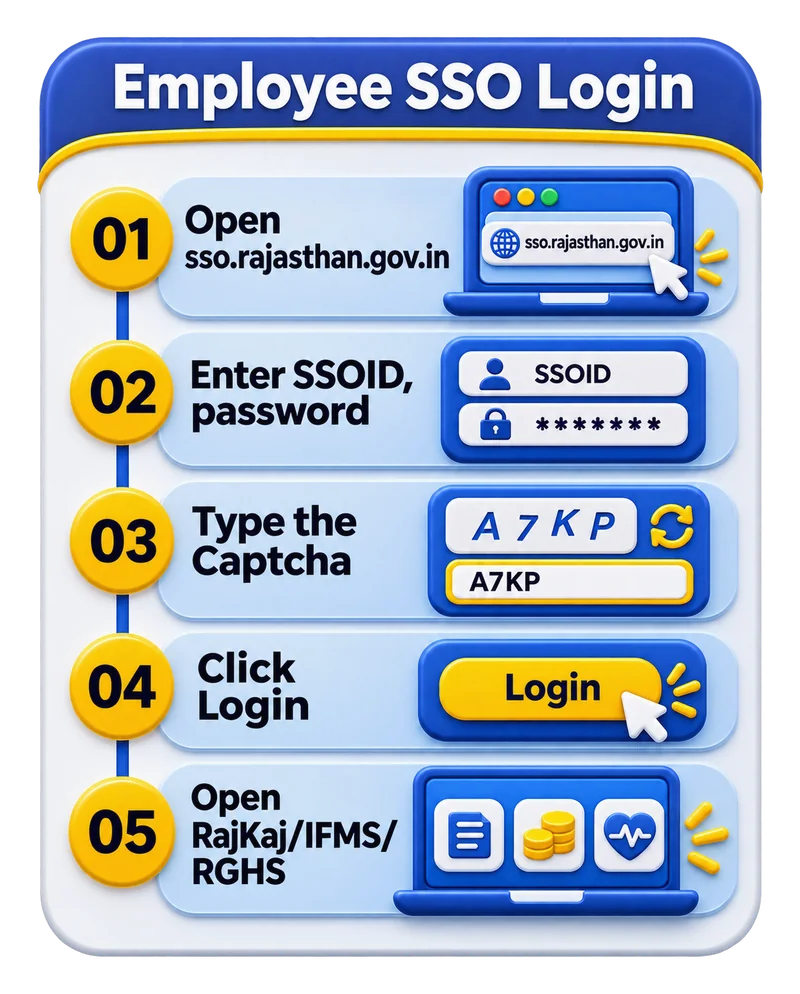
SSO ID Employee Login: Step by Step
Logging in as an employee is the same as for any SSO user. The difference is what you see after login: your department apps.
Step 1: Open the Official Portal
Type sso.rajasthan.gov.in in your browser yourself. Do not log in through links in forwarded messages. Use the English/हिन्दी toggle at the top if you prefer Hindi.
Step 2: Enter Your SSOID and Password
In “Digital Identity (SSOID/ Username)” enter your employee SSO ID. Then type your password in the “Password” box.
Step 3: Fill the Captcha
Type the characters in “Enter Captcha”. Use the refresh icon for a new one or the audio icon to hear it.
Step 4: Click “Login”
Click “Login”. The page also offers a “Meri Pehchaan” button (the national single sign-on, powered by e-Pramaan); use it only if you have set that up.
Step 5: Open Your Department App
On the dashboard, click the tile for RajKaj, IFMS, RGHS or any other app you need. If a tile is missing, your role may not be mapped yet; ask your office’s nodal officer.
Step 6: Log Out After Work
Always log out, especially on shared office computers. Never save your password in a shared browser.
Forgot your password? Use sso.rajasthan.gov.in/forgot (by “Mobile” or “Email (Personal)”), or from your registered mobile send RJ SSO PASSWORD to 9223166166. Full steps are on our password reset page.
Common Employee Login Problems
Most employee problems come from details that do not match the service record. Fix the record first, then try again.
“Employee ID not found” while registering or verifying.
Check the ID with your office or DDO; a single wrong character is enough to fail. If your name, date of birth or gender differs from the record, get the record corrected through your office before trying again.
OTP goes to an old mobile number.
The OTP goes to the number in your employee or SSO record, not the phone in your hand. Ask your office to update the number in your service details, then see changing your SSO mobile number.
I forgot my SSO ID.
From your registered mobile, send RJ SSO to 9223166166, or use sso.rajasthan.gov.in/forgotsd and choose “Govt. Employee”. This works only if you logged in at least once on or after 07/09/2018.
RajKaj, IFMS or RGHS tile is not showing.
App access is given by role. Your department’s nodal officer or the app helpdesk needs to map your SSO ID to the app.
I have both a citizen ID and an employee ID.
Use the ID your department apps are mapped to. Do not deactivate or merge an ID without checking which apps and applications are linked to it.
Captcha keeps failing or the page will not load.
Refresh the Captcha, check upper and lower case, clear the browser cache and try again. More fixes are on our SSO ID problems page.
Employee Helpdesk Numbers
These app helpdesks are listed on the official SSO helpdesk page (sso.rajasthan.gov.in/helpdesk). They work on working days, 10 AM to 6 PM. For general SSO issues, use your district RajSSO helpdesk on our helpline page.
| App | Phone | |
|---|---|---|
| Raj Kaj (e-Office, HRMS, IPR, PAR/ACR) | 0141-2921304, 0141-2922281, 0141-2921149 | [email protected] |
| IFMS / IFMS 3.0 | 0141-2924501 | [email protected] |
| RGHS | 0141-2740252 | [email protected] |
| Rajasthan Attendance System | — | [email protected] |
| RajSSO and Email services | 0141-2925556 | [email protected] |
When you write to a helpdesk, mention your SSO ID, employee ID, department and a screenshot of the error. Never send your password or OTP.
हिंदी में जानकारी
राज्य सरकार के कर्मचारी SSO पोर्टल के रजिस्ट्रेशन पेज पर अलग “Govt. Employee” टैब से अपनी SSO ID बनाते हैं, जिसमें कर्मचारी (SIPF) विवरण लगता है। लॉगिन के लिए sso.rajasthan.gov.in खुद टाइप करें, SSOID, पासवर्ड और Captcha भरें और “Login” दबाएं। डैशबोर्ड पर RajKaj, IFMS, RGHS जैसे ऐप आपकी भूमिका के अनुसार दिखते हैं। “Employee ID not found” आए तो अपने कार्यालय से कर्मचारी आईडी, नाम, जन्मतिथि और मोबाइल नंबर रिकॉर्ड में जांचवाएं। SSO ID भूलने पर रजिस्टर्ड मोबाइल से RJ SSO लिखकर 9223166166 पर भेजें।
FAQs
Conclusion
For SSO ID employee login, register once on the “Govt. Employee” tab, keep your employee ID and service-record mobile number correct, and log in at sso.rajasthan.gov.in with your SSOID, password and Captcha. Your department apps then open from one dashboard.
Most errors come from mismatched records, so fix them through your office first, then contact the right app helpdesk listed above. For Hindi steps on creating an ID, see SSO ID कैसे बनाएं.